★★★ 3 stars by default

Here’s my star rating system for everything:

⭐️⭐️⭐️⭐️⭐️ Loved it!
⭐️⭐️⭐️⭐️ It was good
⭐️⭐️⭐️ It was OK
⭐️⭐️ I didn’t like it
⭐️ Hated it

With me, everything gets 3 stars by default. Books, movies, photographs, everything: 3 stars right off the bat. I always assume that this new thing or person or conversation will be OK at the very least. This applies to more than just media. It applies to people, too. Sometimes I’m disappointed and end up with 1 or 2 stars, but more often than not I’m surprised and delighted and my opinion of something or someone goes up rather than down.

Too many people seem to start out assuming everything and everyone only deserve 1 or 2 stars. They expect to dislike everything by default. This doesn’t seem healthy to me. Why go out of your way to look for trouble?

Permalink #

Tools and Toys

…skip any definitive conclusions, as we know you might change those at any time. ????

@ron on micro.blog

Ron was referring to my still-forming opinions about the reMarkable tablet, but he could be referring to any number of things. I have a reputation for frequently changing up my process/tools/systems/workflows/what-have-you. This reputation is not unfounded, but for some reason I feel the need to explain (defend?) myself.

Or perhaps it’s easier to describe what I’m not doing:

I am not looking for the perfect tool or system. I simply like to try new things.

Many people seem to assume that I’m wasting time constantly searching for some better, more-perfect solution. I don’t believe that’s it at all. I’m not wasting my time, I’m having fun!

Let’s look at note-taking and cameras as two good examples.

I don’t need any new note-taking tools. I don’t need a different process for taking notes. I don’t need to take “smarter” notes. Note-taking is a solved problem. If I want to write something down, I open a text file and write it down. Now, that could be done using Vim or BBEdit or Emacs or whatever. Doesn’t matter, as long as what I’ve written is in a text file and I can find it later if needed. This would be different if I was an academic or an author working on a novel, but I’m neither of those.

However, I’m fascinated by how other people do things and the tools they use. I love seeing how different tools solve different problems for different people. I love novelty. This is why I started using Vim in the early 2000s when BBEdit worked just fine. I’d heard so many people rave about modal editing with Vim that I had to try it. Turns out they were right. Modal editing has informed nearly every text-editing decision since I learned it. One can’t dig into Vim without also hearing about how great Emacs is. I tried and failed to get into Emacs a few times, but then Spacemacs came along and made it easy for Vim users to adapt. Then Doom replaced Spacemacs because it was simpler and faster. And one can’t use Emacs without running into Org mode. Then Roam showed up and made automatic backlinks a thing, and I loved that. I still do. In fact, I still enjoy using all of them: BBEdit, Roam, Vim, Emacs, Craft, Obsidian, Logseq, Mem, iA Writer, Ulysses, and on and on. Hell, I still use paper about half the time.

It’s the same with cameras. I want to experience them all; big, small, cheap, expensive, old, new…all of them. I have or have had some of the (objectively) “best” cameras ever made. (And no, the best camera is not the one you have with you if what you have with you is a shitty camera.) I don’t make photographs for a living, so it’s incorrect to describe a camera as “just a tool.” For me, cameras are toys! Sure, I look for the ones that work well with the way I like to take pictures, but they all have good and bad qualities. I like trying cameras with varying combinations of those qualities.

This all happens because I want to try the things I read about. If someone writes passionately about something they use, whether it be software, hardware, or process, I want to try it for myself.

But let’s be clear, I don’t need any of it beyond a basic text editor and, say, my iPhone.

All this stuff is like a giant toy box. And much like Andy in Toy Story, sometimes I find a new favorite toy. This means that old favorites get left in the box for a time. Then one day I re-discover an old favorite and out it comes. There need not be anything “definitive” about it.

Old friends

Permalink #

HEY or Fastmail? The Answer.

TL;DR: I’m sticking with

HEY for my email, but there’s a surprise twist: I’m also sticking with Fastmail. Hear me out.

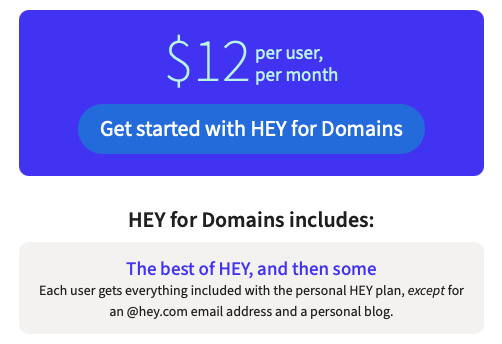
I was initially disappointed with the implementation of custom domains in HEY. You can read the whole almost-rant here, but the short version is that I thought I was going to lose both my @hey.com address and my access to HEY World for quick blogging. And it would cost me $20 more per year for the priviledge. If I wanted to keep my address and HEY World, I’d have to pay for both accounts at something like $199/year. That wasn’t something I was interested in. I later learned that there is a discount for current users. This put the total at a much more reasonable $123/year for custom domains, my old address, HEY World, and the additional features of “HEY for Domains”.

HEY with the discount on HEY for Domains made more sense, but didn’t allay my original concerns about switching everything to HEY; the biggest being lack of standard IMAP access to my email. Dumping my most important account into a proprietary service still gives me hives and I’m not sure I’ll ever be comfortable with it, so I did the math on keeping both my Fastmail and HEY accounts.

This means that if I keep both HEY for You and Fastmail, I’m paying $25 more per year, but I get everything:

  • Great email experience (HEY)
  • My @hey.com address (HEY)
  • Blogging with HEY World (HEY)
  • IMAP access to my email (Fastmail)
  • Inherent backups (Fastmail, but email will remain in both accounts)
  • Keep all history (Fastmail)
  • Fall back in case the HEY folks lose their minds or just go away.
  • Additional user for $30/year (Fastmail, my wife isn’t interested in using HEY)

The only thing missing would be the “Team” features of HEY for Domains, which I don’t need.

It seems I’ve been able to rationalize keeping both services and thereby avoiding the need to actually make a decision ????. I have until May 30th to decide if this works.

Is email worth $150/year? To me it is. Am I missing anything?

Permalink #

Hey for Domains? Maybe.

(Updated with notes about the custom domain discount)

Other than having a couple of nits to pick, I really like using HEY! for my email.

After considering the pros and cons and waffling between dropping the service and going all-in, I’ve been leaning toward all-in. HEY offers an opinionated, clever, and pleasant set of features that’s not found elsewhere. A big missing piece for me has been custom domain support.

I’m fine paying the higher price for HEY because I love the service. For that price, though, custom domains should be table stakes. I was looking forward to consolidating things and canceling my long-standing Fastmail subscription once custom domains were supported. I would even pay a buck or two more for my own domain, even though I feel like the current price should include it.

I’ve known for months that custom domain support was coming, so I was waiting for that before committing.

I’m glad I waited, because as it stands I won’t be sticking with HEY.

Basically they’ve just rebranded HEY for Work as HEY for Domains. I don’t want HEY for Work. It’s only me here. I want HEY for You (aka Me) with my own domain.

So, instead of my custom domain riding atop the existing @hey.com address, I have to create and pay for an entirely new account to use custom domains. This means if I want to keep @hey.com I’ll be paying for both accounts. Nope.

So what’s the big deal about giving up the @hey.com address? Honestly, it’s not that big a deal. I’ve only sparingly used that address. I’ve been forwarding my baty.net email from Fastmail and using SMTP forwarding for replies. This works OK, but means I still need to keep (and pay for) my Fastmail account. I’d rather not. But, what’s worse is this…

You see, I also lose the option of using HEY World. To be fair, I’ve only dabbled with HEY World but it’s intriguing and could find a place at some point. Not if I move to HEY for Domains, it won’t.

I’ll keep saying it… I love HEY for my email. It’s an opinionated service, which comes with risks, but up to now the folks behind it have done a great job selecting and implementing features. I fear that with the way custom domains via HEY for Domains is implemented, I may not be able to stick around and see where it leads. This is a shame. I mean, the upcoming Recycling feature looks terrific and useful. I may never know.

This post is mostly a knee-jerk reaction to the HEY for Domains implementation. To be fair, it’s early and the Basecamp folks may decide to tweak things favorably if they receive a lot of feedback like mine. I have until June before my HEY for You subscription is up for renewal. I hope it works out.

UPDATE (2021-04-23 16:50): I didn’t know about the discount offered here: https://hey.com/custom-domains/. This offer makes using HEY for Domains much more palatable.

Permalink #

A New Guild System – The Hedgehog Review

A New Guild System | THR Blog | Blogs | The Hedgehog Review:

At a time when, as Levin points out, people tend to see participation even in such august institutions as the United States Congress as a platform for building their own personal brand, the solo-proprietor world can all-too-easily become branding all the way down and the personal website a device for constant ego-feeding.

“Branding all the way down” indeed.

Permalink #

I think I see the light (meter): how to buy one – The Machine Planet

Dante Stella, The Machine Planet:

Spot meters help you sort out the various tones in a scene so that you can spend 1000x the effort to get a picture that is 10% better than an averaging reflective meter used correctly. Spot meters, like communism, seem like a great idea until you try to use them on an everyday basis.

I once said that spot meters are for posers. Dante seems to agree :). Other than some fine snark, the rest of the article contains a lot of good information about light meters.

Permalink #

My Holy Grail Pen and Paper – CJ Chilvers

Writers spend way too much time and money seeking out their “grail” pen and paper combo — the tools that will make their work so much “smoother.” It’s a pattern we’ve seen repeated in all creative pursuits.

CJ Chilvers

Why does he quote “smoother” here? Is that from something? It’s an odd word for describing creative work.

I’m happy that Chilvers has a setup that works for him and that he doesn’t feel a need to try anything else. A little envious, even. On the other hand, I don’t love the insinuation that people who try different tools are somehow on a futile and unnecessary quest that can never lead to anything other than frustration and reduced creative output. OK, that might be me reading too much into it, but, isn’t it possible that some people simply enjoy trying new things? Can the search for better or more enjoyable tools never be more than just blind consumerism or creative procrastination?

Permalink #

A few from Roll-004

I haven’t been using film much this year, but once in a while it’s fun to get out and shoot a roll. I took the M6 out yesterday and finally finished the roll of HP5+ that I’d loaded into it a month ago. Here are a few from the roll. Most of these were shot while out walking around the neighborhood.

Sorry, images were lost during a website move

Permalink #

My blog's overwrought theme

Everything in my life has become overwrought, overthought, overdone, and needs to be unwound.

Today, I’m dealing with this blog at copingmechanism.com. A few weeks ago I decided to go back to using WordPress (again), and dammit I’m going to try sticking with it this time. But, I don’t like any WordPress themes. There are thousands of them, and I can never find one that works for me. Oh, I find a lot of them that make me say, “Ooh, cool!” and install immediately and say, “There, that’s nice!”

The theme I was using up until this morning is “Hive” and it’s a fancy, nice-looking theme.

Magazine layouts like Hive’s are more suitable for occasional full-on articles and that’s not really what I’m doing here. I just want to share some stories, post some quoted links, and show off a few photos. I want things to look nice and be easy to read and navigate. You know, like blogs used to be before WordPress and SEO and relentless self-promotion decided we all needed giant hero images and featured posts and animation and just more of everything.

Hive is nice, and does some nifty things, but this makes it all feel like too much for me right now. Too much JavaScript, too many clever typographical tricks, and way too much animation. I could spend time figuring out how to dial it all back, but what I really want is a reverse-chronological list of full blog posts that readers can easily scroll through without a lot of hoo-ha. It shouldn’t be so difficult to find something to help me do all this without building something from scratch myself.

For now, I’m going fall back to my old stand-by theme, Independent Publisher. It’s not perfect, but it’ll get the job done while I work on something better.

Update April 17, 2021: I may have found one I don’t hate: Graphy. Trying it now.

Permalink #

My new note-taking system: Don't take notes.

It feels like the entire world (or at least my corner of) is consumed by the “how” of note-taking. Tools, workflows, processes, backlinks, and on and on. Obsidian? Roam? Paper? I read it all. It’s fun and interesting and there’s no end of things to distract myself with. A distraction is all it is.

None if it really matters, though, and yet we endlessly split hairs and wring our hands and gaze at our navels over irrelevant minutiae. It’s exhausting. I’m not one of those people who wear “I never change my system” as a badge of honor. I can’t seem to stop. I’m too curious for that. FOMO and all.

As an attempt to extract myself from this loop, I’ve decided to stop taking notes for a while. This doesn’t mean I’m going to stop writing. Writing isn’t note-taking. Nor is journaling. I’ll still do that. That’s what all of this is supposed to be for, isn’t it? But I won’t be jotting down my recent thoughts about minimalism or digital record-keeping or the details of a conversation I had with a colleague or how much I paid for the wrench I just ordered.

No more Roam vs Obsidian vs Tinderbox vs Org mode vs The Archive or what-have-you until I stop obsessing over which is better or more private or more open source or if it uses the right kind of Markdown. No more worrying about whether I’m taking “smart” enough notes or if this one should be “evergreen” or not. How long should a zettel be, anyway?

I’m willing to bet there are lots of smart, productive, happy people around that take very few notes and aren’t missing anything. I would love to be one of those people.

Permalink #

Vapid vainglorious video – The Machine Planet

Dante Stella

pokes accurate fun at videos about still photography.

Or check out their stylish walking around, contemplating… stuff while wearing messenger bags. Sir, we all know that’s a camera bag and that it will crush the life out of even the most carefully basted sportcoat shoulders. A gentleman would never carry anything larger and cruder than a Contax T, which slips handily into the pocket of any pocket of any piece of clothing.

Many of these videos look like unpaid promotions for purveyors of peripheral photographic gear. On some videos, you can ascertain that every manufactured good in the scene has a name and a manufacturer. Please, do tell where I can buy another $70 nylon strap that looks like something cut out of the restraint system of a passenger car.

Video and/or audio instead of, rather than in addition to, written text wastes a lot of opportunities.

The lack of information density is not just a feature of photography videos; it is also feature of almost any technical video about anything. If the solution for cleaning something is vinegar or ammonia or something else, there is no need to package a very simple idea in a very elaborate video. If the key thing in touching up car paint is selective 3000-grit sanding and progressive application of thin layers of paint with more wet sanding, well, that’s easy to say. Omegas are almost as good as Rolexes. An Acura is not as fly as a Bentley. Follow me for more recipes.

I’m convinced that the “pivot to video” continues to be a colossal waste of everyone other than Google’s time.

Permalink #

Are automatic backlinks useful?

When I started using Roam, I found the way it handled backlinks to be a revelation. Other software does backlinks, but Roam’s implementation made it feel new. Suddenly, backlinks felt necessary.

I started writing everything in Roam’s Daily Notes, and I’d link things by putting brackets around each word or phrase that I thought I might want to review later. I made lots of links. After a while, I noticed that many (most?) of these linked words and phrases would end up as empty Roam pages containing nothing but backlink references.

In effect, what I was doing was creating saved searches.

I noticed something similar in my TiddlyWiki at rudimentarylathe.wiki. The automatic backlink references at the bottom of each note were in most cases links from one of the daily notes, and this ended up as a collection of backlinks like “2021.04.10 – Daily Note”. Not very helpful. Would I be better off just searching for the topic in question? I think so, so I recently changed the note footer on the wiki to do just that. It now shows a list of “tiddlers” with the most mentions of the current tiddler and also those with titles containing the same word. You know, like saved searches.

I’m starting to question the value of automatic backlinks in my notes. I still want them, but I’m not sure I need them the way I thought I did. They no longer feel necessary, but are they useful?

I started thinking about this again after re-reading Sascha Fast’s post, Backlinking Is Not Very Useful — Often Even Harmful. I had an adverse reaction to the article when I first read it. I thought it was mostly sour grapes because Roam was eating The Archive‘s lunch. I read it as, “The Archive doesn’t have automatic backlinks, so they must be bad and you don’t need them!” There was this right in the first paragraph:

Automatic backlinks are not only automatic when there is software that is showing them for you. If you create a backlink apparatus by habit it is still automatic. The automatization software would then be in your head

Sascha Fast

That felt like some rationalization gymnastics right there. I looked up “automatic” and it said, “done or occurring spontaneously, without conscious thought or intention”. A habit of manually creating links still involves conscious thought and intention.

And then the article went on to try and cast automatic backlinks as “linking notes” vs manual linking as “connecting knowledge”. I thought that was a bit of a semantic crutch.

Here’s another stretch…

Just think a moment about how difficult it really is to use the internet and its web in a productive way. The single most productivity-destroying problem with using the internet is the temptations link provide. The same is true for your Zettelkasten if your link structure is not well-groomed.

Sascha Fast

To compare the distraction of links on the internet at large to those within my own writing in a curated Zettelkasten doesn’t seem at all relevant.

I was looking for problems with the article going in, and I felt that I found them straight away, so I skimmed the rest with a jaded eye and a bad attitude.

I may have overreacted.

Now that I’ve spent a year building my notes using tools that make backlinks easy and automatic, I’m coming around to Sascha’s point of view. I have hundreds of empty “pages” containing nothing but backlinks. There’s no context, no color. No knowledge. It’s just “linking notes”. Here’s Sascha’s closing comment:

Backlinks are a perfect example on how features of software not only can be useless but actively harming you work by redirecting your attention towards to the superficial belief that you need to place links, instead of trying to connect knowledge.

Sascha Fast

I still feel that “harmful” is an exaggeration, but I better understand his point now that I’ve had some time with it.

The answer to the title of this post is, of course, “It depends”.

Many people use the term “zettelkasten” for any old pile of notes. But for a true zettelkasten, one containing notes specifically intended to help garner and build one’s knowledge over time, automatic backlinks aren’t as useful. Explicitly linking between ideas and notes and providing context for the links is much better.

For other collections of notes, though, automatic backlinks can be very helpful, even though they aren’t functionally much different from saved searches. For example, I keep notes about people I know. Having backlinks created automatically whenever I link to “Mom”, for example, is a nice way to see all of the times I’ve mentioned her, right there next to my notes about her. This, for me, is very useful. Hi mom!

Permalink #

Back to Fastmail?

My first annual subscription to Basecamp’s

HEY email service is about to expire, meaning it’s time to decide whether I will be renewing.

I don’t think I will.

This makes me sad, because I really like using HEY for email. They’ve done a great job re-thinking how we interact with email and most of their decisions have been spot on.

I forward baty.net email from Fastmail to my HEY account and, now that they support SMTP forwarding, I can reply from there as well. Soon, they are likely to fully support custom domains, meaning I could move jack@baty.net directly into HEY and be done with it.

And that’s where I have a problem. Email is the most important account I have. It’s the key to everything. HEY is not “normal” email. There’s no access to it via the standard IMAP interface or even POP3.

One of the reasons I like HEY is that I can’t change email clients. This is nice, because it means I’m not wasting time looking for the perfect tool. I just use HEY’s apps and that’s settled then. I trust Basecamp, but with HEY they control my email and it’s in a sort of black box, with no access to it outside of HEY’s own clients. This gives me hives and I’m not sure I can learn to be comfortable with it, despite appreciating the constraints.

Another factor is that I’m planning to move my wife’s email away from its current host and going to HEY might be too big a leap for her, workflow-wise. I can add her to my Fastmail account for $30/year where a new HEY account would be another $99.

I’ve got a couple weeks to decide, but right now I’m leaning toward sticking with a known, safe, stable quantity: Fastmail.

Permalink #

Moom, Minus, and Keyboard Maestro

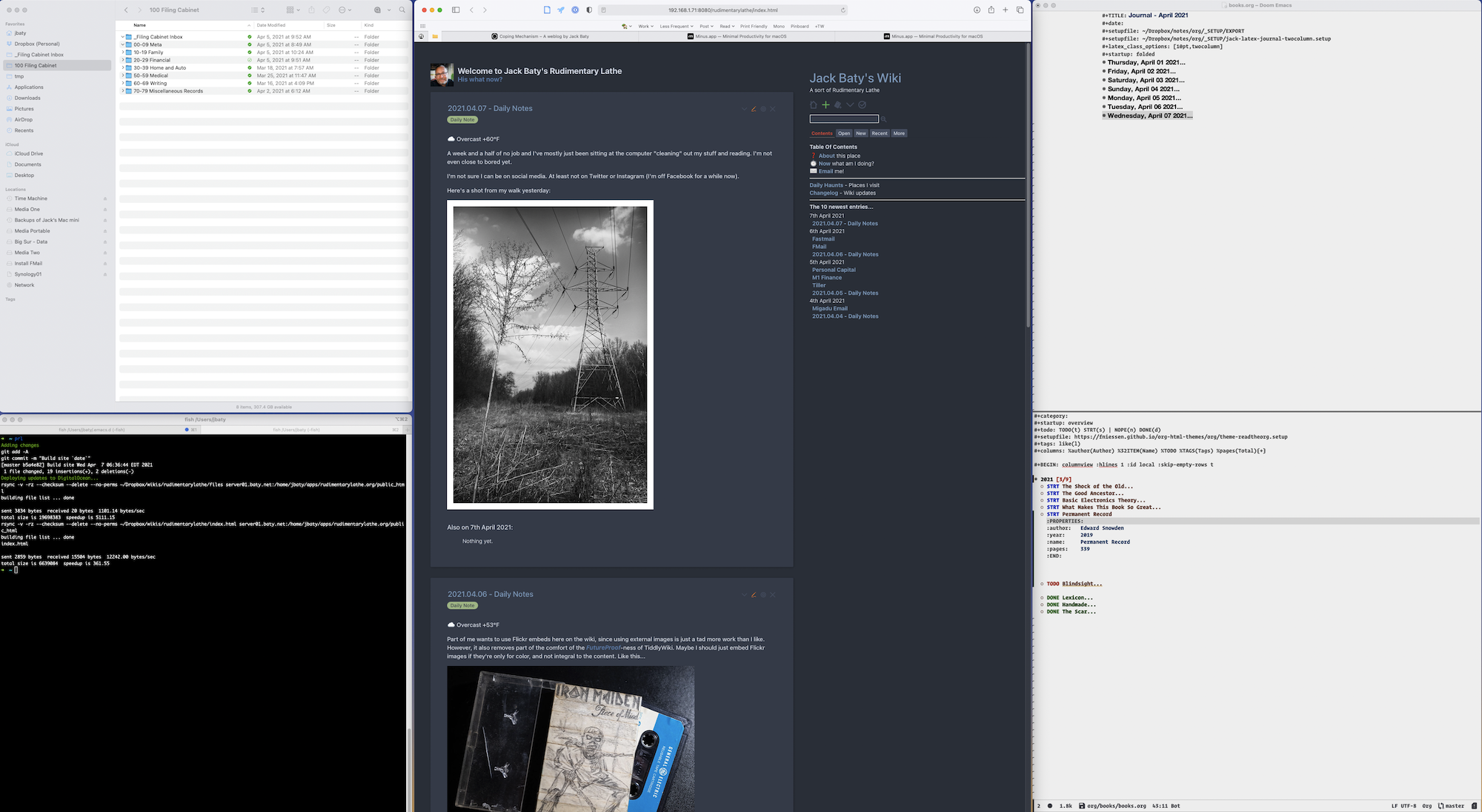
Using a single 32-inch monitor with my M1 Mac Mini has caused me to re-think how I manage apps and windows. After a few iterations, I’ve settled on the following layout.

This layout includes Finder, iTerm2, Safari, and Emacs. Safari takes up the majority of the center. Finder and iTerm are split equally on the left, and Emacs is on the right, divided into two windows (or “panes” as most other software calls them). All my most-used apps are visible at the same time and I’m not constantly moving windows around.

I love this setup, but sometimes I need to resize things so they better fit the content or maybe move an app out of the way for a minute. I use Moom to put everything back for me.

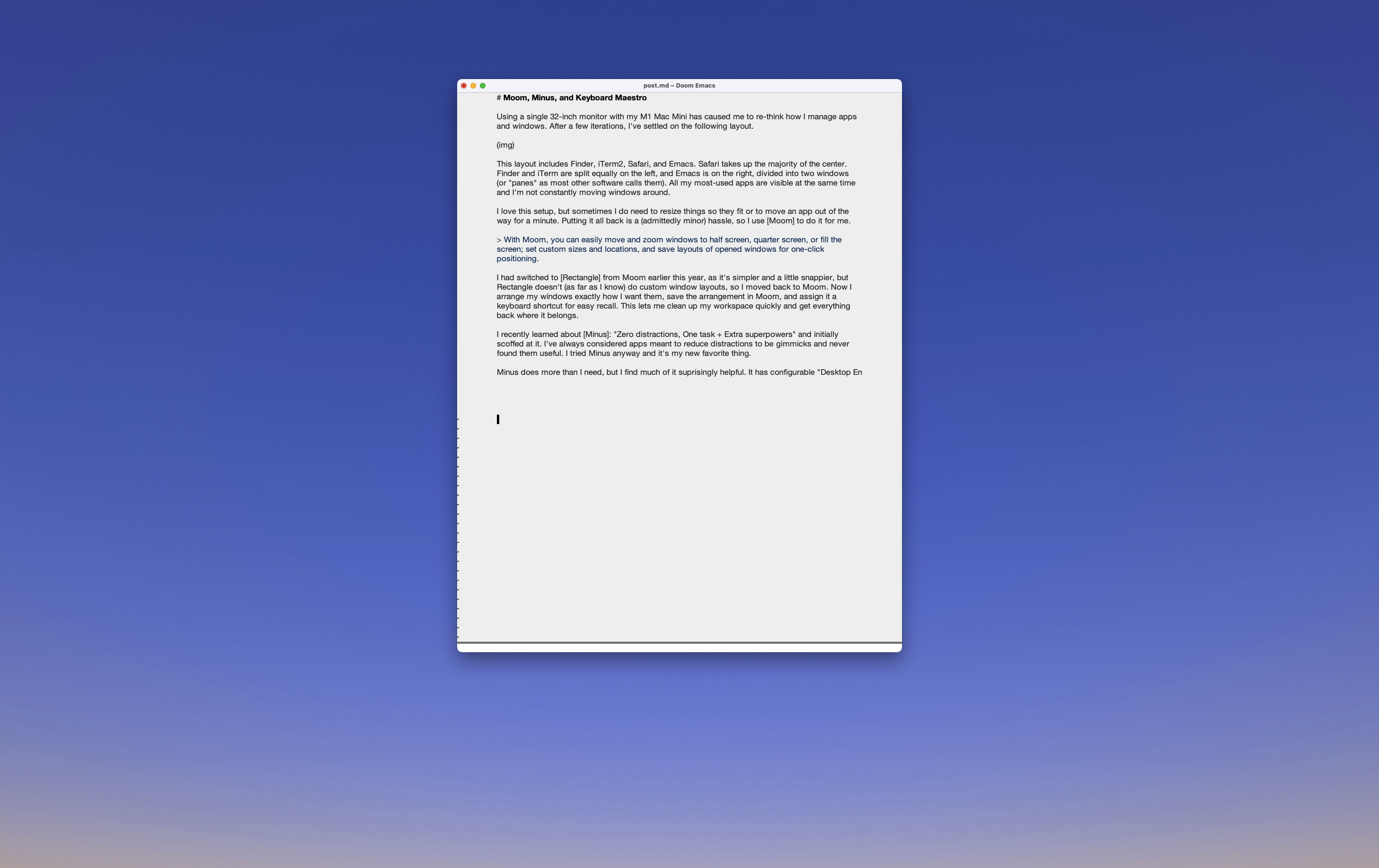
I had switched to Rectangle from Moom earlier this year, as it’s simpler and a little snappier, but Rectangle doesn’t (as far as I know) do custom window layouts, so I moved back to Moom. Now I arrange my windows exactly how I want them, save the arrangement in Moom, and assign it a keyboard shortcut for easy recall. This lets me clean up my windows quickly and get everything back where it belongs.

I recently learned about Minus: “Zero distractions, One task + Extra superpowers” and initially scoffed at it. I’ve always considered apps meant to reduce distractions to be gimmicks and never found them useful. I tried Minus anyway, and it’s turned out to be great.

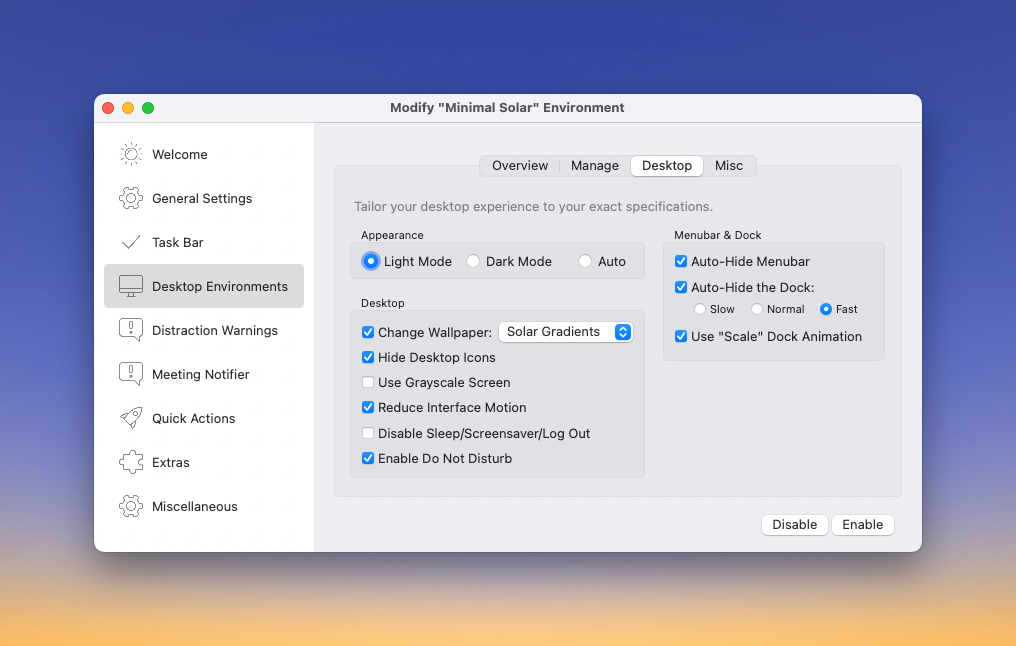
Minus is not something I expected to find useful, but it really has made a difference. It has configurable “Desktop Environments” that will configure my Mac in a number of helpful ways. My default environment configuration does the following:

  • Hides all apps
  • Switches to a specific, simple wallpaper
  • Hides desktop icons
  • Turns on “Auto-hide” for the Dock
  • Turns on “Auto-hide” for the menu bar
  • Enables Do Not Disturb
  • Closes all “Distractions”

Here is what the settings panel looks like:

And here’s what my screen looks like after triggering Minus (by hitting CMD-ESC) and then bringing Emacs to the front so I could continue writing this post:

Ahhh, so quiet and uncluttered.

Minus lets me define “Distractions” and will let me know when I venture off into places I’ve told it I shouldn’t. For example, if I visit Twitter the entire screen will go all gray and display a distraction warning. My options are to close the distraction or, if I really want to check Twitter, snooze the alert. This feature has made me painfully aware of how often I drift off into social media land. Minus has a few other features that I don’t use or need, but it’s been great at helping me keep things tidy and focused.

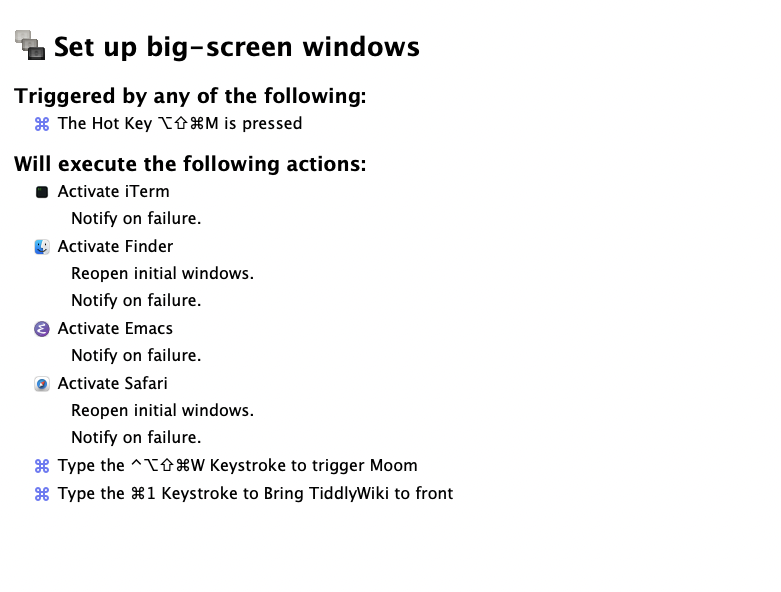
Tying all this together is Keyboard Maestro. I use a KM macro to make sure all the relevant apps are running, trigger Moom, and activate a specific tab in Safari. Here’s the macro:

So at any time, I can hit Command-Option-Shift-M and everything is reset and ready to go. Or, I can just activate Minus (via mouse or Command-Escape) and have completely tidy blank slate to start with.

Permalink #

Renting eBooks

None of the old books on my Kindle mean anything to me. They’re just there. I never see them, I never re-read them. I never

use them for anything. Seems like a waste.

In addition, I’ve recently purchased a couple of hardcover books that I didn’t enjoy. So now what? They’ve gotta sit on my shelf forever? I suppose I could always give them away, but that’s also work. (Advantage, real books, though).

What about the library? While I love the idea of going to libraries, I almost never do. The pandemic hasn’t helped, of course.

I ruled out renting eBooks from my local library a couple years ago, since they didn’t use the only relevant rental/reading service, OverDrive with Libby. Haven’t thought about doing that again until recently, on a whim, I checked the library’s site and discovered that they have finally started making books available via OverDrive/Libby.

I signed in using my library card number, browsed a bit, and checked out 3 books. Two of these were only available in ePub format, so I’ll have to read them using the Books app on my iPad. But the third was available for the Kindle, which is what I was hoping for. For the record, the books are Permanent Record by Edward Snowden, Zero World by Jason M. Hough, and Blindsight by Peter Watts.

This is so cool! It means I get to experiment with all sorts of different books without the cost and commitment of ownership. I’ll still buy books, of course. I love books. I love having books. But I’ll only need to buy the ones I actually wish to own.

The down side is that it’s kind of slim pickings when it comes to availability. I had to put “holds” on a couple of books that were high on my reading list because they weren’t available. And worse, they aren’t scheduled to be available for 2 or 3 months. It’s OK, this just means I need to dig though the archives and find things that haven’t necessarily been top of mind while I wait.

Permalink #

A few photos from Easter

I haven’t seen my parents in a long time, so we got together on Easter. Everyone is fully vaccinated (ok, technically I’ve only had my first shot) and it was wonderful being “with” people again.

Permalink #

Another attempt and having One True Blog

I am once again having thoughts about only maintaining One True Blog™.

I know, it’s just another mood and it’ll probably change, but as I wrote a few days ago, I don’t feel like blogging lately. I’m wondering if this is partially because I’m exhausted by the decisions around publishing. Just last week I moved my other blog at baty.blog from Blot to Micro.blog and back again. This meant switching from using Emacs to edit posts to MarsEdit (and back). I maintain automation to support all of it, and keeping all those threads going has become less interesting.

I mean, this all used to be fun, right? It still can be fun, but less so, and less often. What if I just typed and hit Post and kept doing that over and over in the same place for a minute?

What if I did all this using WordPress here at copingmechanism.com?

(Of course I’ll still publish short posts on my Micro.blog site.)

Permalink #

The Minolta Autocord

I’ve had this Minolta Autocord for so long I don’t remember where I got it. Or when, exactly.

Mine is a model RG-2 from 1962 with the Optiper-MVL shutter. I don’t know much else about the camera other than it’s fun but challenging to use. I keep thinking about taking it out for a spin but haven’t done that in a few years.

There’s more info about the Autocord at camera-wiki.org

Here’s an example from the camera. It’s me trying a self-portrait while wearing Mario jammies of course.

Self-portrait at home (2009). Minolta Autocord. Tri-X.

And then there’s this crazy thing…

Jack self-portrait with Gas mask (2010). Minolta Autocord. Tri-X.
Permalink #