Many things I do turn out, in hindsight, to have been a complete waste of time. Journaling in my paper notebook/scrapbook is not one of them.
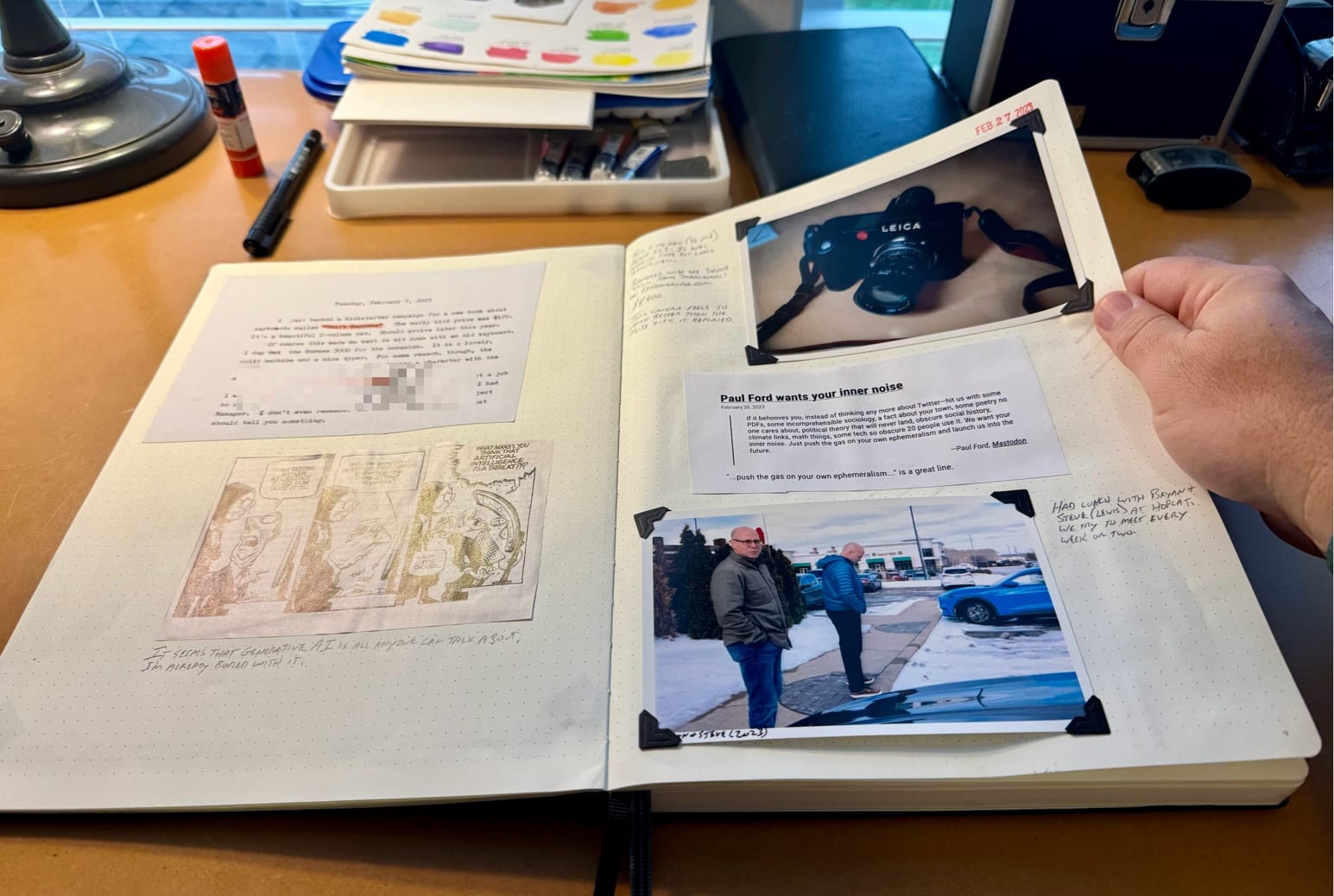
A page from February, 2023
I just love randomly flipping through them. I revisit these pages much more often than I do my old Day One journals or even my Org journal. I love how permanent they feel; how stable and immutable they are.
At first I tried to be precise and selective about what goes in them. The A4-size Moleskine notebooks I use cost around $25ea., so I didn't want to "waste" them. That was silly. I've found that the more random and haphazard I get, the more I enjoy them. All bets are off, cost be damned!
So, what goes in them? Anything! I mostly add photos with a caption and bit of backstory written next to them. But I also glue in ticket stubs, comics or ads cut from magazines, cut up bits of pages I've typed up on a typewriter, index cards with quotations, business cards, whatever.
It doesn't matter if I skip a week or a month. 10 years from now it'll all be compressed into "the past" anyway. I don't beat myself up about it.
I do wish I would write more and longer actual journal entries. If I'm honest, the notebooks have become more scrapbook than journal, but I don't care. They're priceless.
Mike mentions disabling Alfred and going back to using Spotlight as an app launcher. I’ve been having similar thoughts.
I use Raycast, and its latest release notes are mostly around features of the $8/month subscription version. I thought, there’s no way I’m paying monthly for what’s basically a glorified app launcher, which brought me back to thinking about Spotlight.
My first app launcher was Quicksilver and it immediately became an intregal part of using a Mac. From there I moved to LaunchBar and then to Alfred before settling on Raycast. I still sometimes fire up LaunchBar because it’s great for navigating the filesystem. And it’s faster.
My first week with Raycast was spent installing extensions and writing little scripts: everything from deploying my websites to resizing images to creating notes. Then, I barely used any of them. The only fancy Raycast extension I use regularly is for resizing images selected in the Finder.
So after getting all huffy about not paying for a Raycast subscription, I dropped all the way back to Spotlight. It lasted two hours. I don’t want to even use a computer if there’s no clipboard history. If I need to install another app to get that, then why not just use the one built into the app launcher?
As a way to feel better about all this, I’m going to run with Alfred today and see how it feels.
⚠️ This blog is no longer running Kirby, but I left this here just in case.
I've recently whittled my servers at DigitalOcean down to a single 2GB instance running Caddy. When I started playing with Kirby, I tried getting it running there, but had issues with php-fpm and Caddy not playing well together, so I spun up a hosted instance at (link: https://fortrabbit.com/ text: Fortrabbit).
Running Kirby doesn't require a database or anything fancy, just a web server and PHP, and it bugged me that I couldn't get it working, so yesterday I tried again, and finally figured it out. I'm writing this down so that I don't lose it.
That's it. I'll need to add headers and a whole bunch more redirects, but this works. I don't love that the PHP version number is hard-coded in the socket path, but that's the only thing that worked for me.
The other change I made was to configure php-fpm to run as user and group jbaty/caddy in /etc/php/8.1/fpm/pool.d/www.conf. There's probably a better way to do this, but I couldn't find a combination of permissions that would work for both control panel updates and editing the content files directly.
I like having everything on a single server, so this is better, even though it requires more work from me. Let me know if you notice anything broken.
I spent the afternoon with my new grandson yesterday. His name is Lincoln. His middle name is Jack. She gave him my name and that might be the nicest thing anyone has ever done for me.
Proud grandpa holding Lincoln
The Kirby experiment continues. I did some work on it this morning. You might notice that the home page now shows a grid of recent posts under the latest Journal entry. Also, the Posts page shows a simple list of posts. No covers or anything. I found the cover images made the page too jarring or erratic or something.
I've been having a blast migrating this blog to Kirby. Setting up new software and learning what it can do is a lot of fun.
This post is mostly a quick summary of how I've found using Kirby so far.
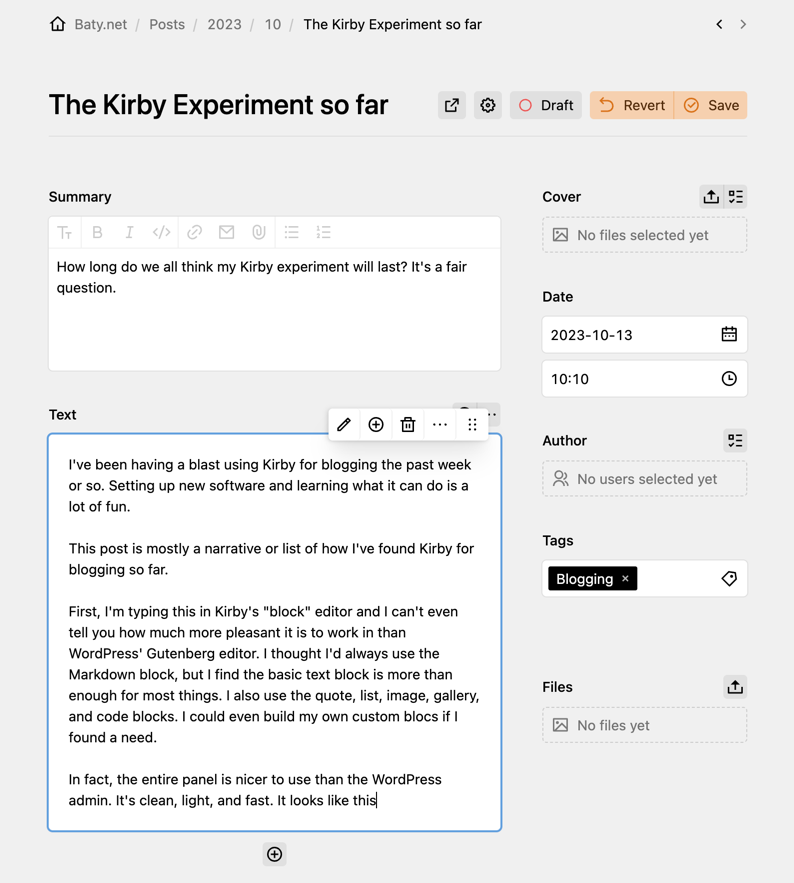
First, I'm typing this in Kirby's "block" editor and I can't tell you how much more pleasant it is to work in than WordPress' Gutenberg editor. I assumed I'd always use the built-in Markdown block, but I find the basic text block is more than enough for most things. I also use the quote, list, image, gallery, and code blocks. I could even build my own custom blocks if I found a need.
In fact, the entire panel is far nicer to use than the WordPress admin. It's clean, light, and fast. It looks like this...
Block content is stored in text files, but the blocks are encoded as JSON objects. This is great for machines, but not as good for people. And I'm struggling with that. Kirby uses text files as a database, which would normally mean I could grab Emacs and start writing. Except when using blocks it doesn't really work that way. Once I've committed to using the block editor, I'll always have to use the block editor. I'm nervous about that. It makes me twitchy, and I've no idea how I could change things later without losing data or at least being forced to translate everything somehow. Like I said, twitchy.
I started out with Kirby's "plainkit" starter kit, which includes only the underlying app. This was good for learning, but quickly became frustrating. I felt like I was building my own blogging engine using PHP and YAML files. That's not what I signed up for, so I started over with Kirby's more complete starter kit. That turned out to be nearly as frustrating, but in the opposite way. It did too much, and it seemed like magic so I struggled with removing things I didn't want without breaking the site. Eventually, I got it working well enough to ship. Okay, maybe it wasn't ready, but I needed to "feel" it in production.
Let's just list the good and bad as I've found things so far. Off the top of my head...
Good
The control panel is nice, clean, and easily customizable to suit different workflows
No database. This point is debatable (I like databases) but there's no denying the simplicity.
I find PHP much easier to work with than Go, and Kirby's PHP is much easier to work with than in Wordpress.
The folks in the forum are ridiculously helpful, and the community is small enough so that it's not mostly noise.
I like the template/blueprint/snippet system. It mostly makes sense and is easy to deal with. Especially coming from Hugo.
Writing posts and managing images is a pleasure overall
Not so good
The "ecosystem" is smaller than Hugo's and much smaller than WordPress'.
Not free. A license is $100 (but is good for three years). Not expensive, but it eliminated Kirby from little hobby projects where I might otherwise try it.
Permalinks are tricky. I've read everything, but can't figure out how to properly and consistently implement a sensible URL structure that doesn't involve confusing hoops and abstractions. And moving content files around later seems like a bad idea. This makes it feel fragile.
Blueprints are YAML files and I still haven't figured out all the different ways to break things. Not for lack of trying!
I worry that if I don't get things set up perfectly up front, changing my mind is going to be a pain.
Blocks are great, but I have a long history with Markdown and I worry that not using Markdown will turn out to be a mistake. Or at least it will be hard to get my stuff out of blocks. Maybe jq or something could help, but still.
There are very few theme options, and many of them cost money. I don't begrudge a small fee for a good theme, but I've not found one I'd be willing to pay for. Sometimes all I want for blogging is to pick a nice theme, make a few tweaks, and write.
So, I'm having fun with Kirby. I love being able to drag a bunch of images into a post and have them ready to use with a single click. I like adding complex content using blocks. The control panel is actually pleasant, which is a nice change. I've always found PHP easy to work with.
All this is nice, but what's going to happen when the novelty wears off? I know me, and the novelty always wears off. I can already feel myself twitching over having content in text files but those text files aren't easily readable or portable. I also have a dozen things on my list to implement or change, and it feels daunting.
The thing I miss most is my nice Emacs writing workflow when using Hugo. I can already feel it pulling at me.
I have now spent many hours reading about Kirby and watching videos. I've learned a great deal. I even built a barebones site with blog posts and camera information and a full-blown panel for managing content and uploading images. I've tried both the empty and the full-blown starter kits. I dig how Kirby works and I quite like managing content via the control panel, but still being able to just edit text files, etc. After all that, I'm stopping for now. There's just too much left to do and I'm out of energy for it this weekend. I'll keep it nearby, and maybe once Kirby 4 is released I'll feel motivitated to finish. You see, I don't know what it's for. I don't know that I have the energy to replace baty.net and move all the content and redirect the URLs and and and. I might make a photo-centric blog with it. Mostly, I started this whole thing as a way to play with Kirby. I've done that. I get it. Now what?
I spent some of the morning writing a new function for generating posts in Hugo. Then, I spent the rest of the morning building out a scaffolding in Kirby. This can't end well.
I create two disinct types of posts here: Regular posts and Journal posts. Each has its own set of metadata and different formats for filenames, so I have two similiar-but-different lisp functions for creating new posts using Emacs. This works fine.
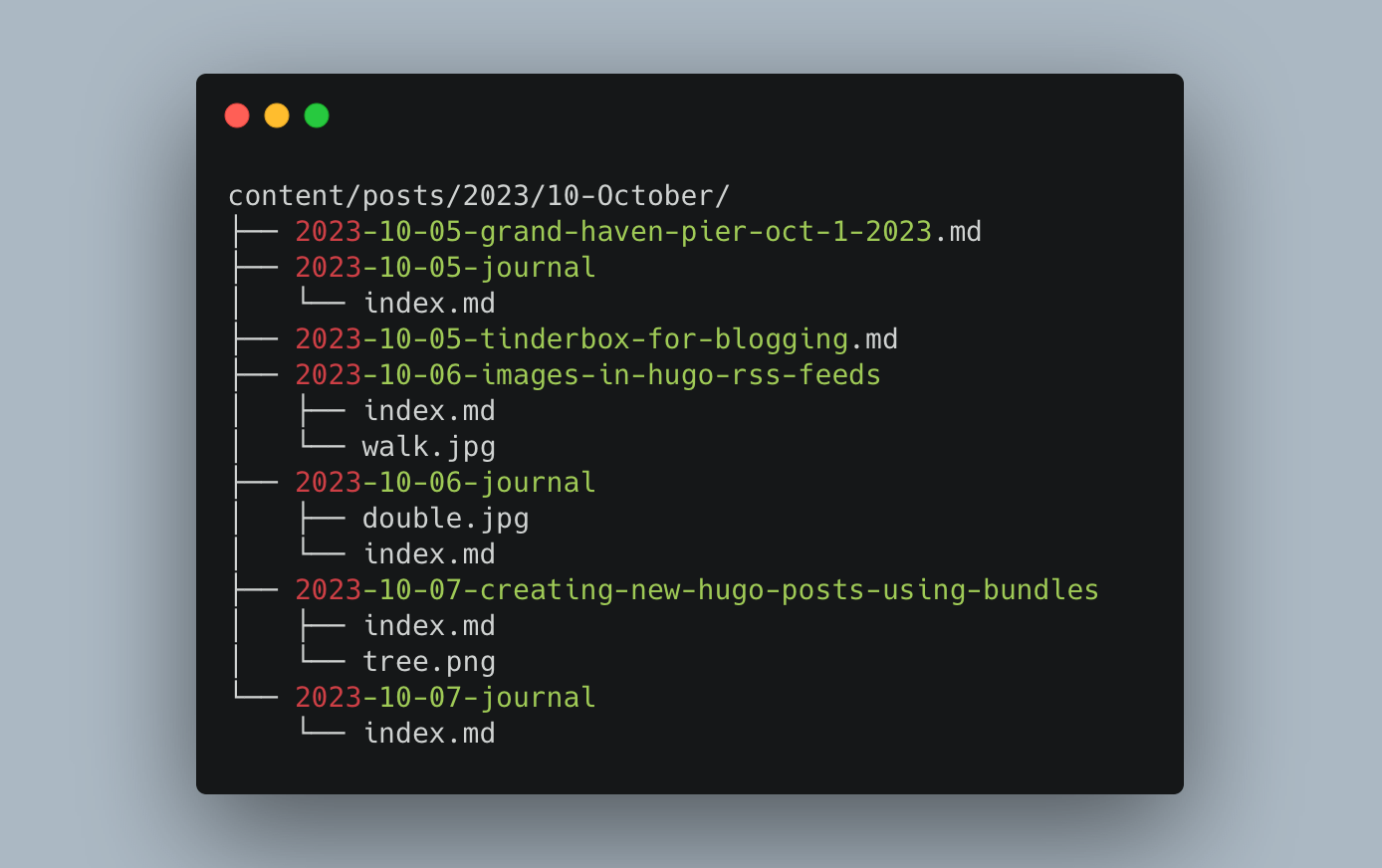
Journal posts take advantage of Hugo's page bundle features, so they go in a bundle like so:
Regular posts, though, either go in a bundle or can be just standalone Markdown files if there are no images in the post. This means that each time I create a new post, I have to choose whether is should be in new-post.md or /new-post/index.md.
Now, I usually have no qualms about copying and pasting code when it's easier and unlikely to cause issues down the road. As Rob Pike said, "A little copying is better than a little dependency." In this case, though, it felt wrong to simply duplicate the function in order to only change the file name.
My brain doesn't get along with Lisp, but I'm using Emacs so that's what I have to work with. My solution was to add a yes-or-no prompt asking if the new post should be a Bundle, and then create the file based on the response. I fumbled around with this for at least an hour before finally finding something that worked. I have no idea if it's the best way to do this. Or even if it's a good way to do it, but here it is[1].
;; Create new hugo post
;; h/t Jeremy Friesen https://takeonrules.com/2021/05/20/emacs-function-to-rename-hugo-blog-post/
(defun jab/hugo-new-post (title &optional)
  "Create new blog post for TITLE."
  (interactive "sTitle: ")

  (let* ((slug (s-dashed-words title))
	 (default-directory (concat "~/sites/blog/content/posts/"
				    (format-time-string "%Y/%m-%B/")))
	 (fpath (if (y-or-n-p "Make Bundle?")
		    ;; If y create directory using slug and add index.md to path
		    (progn
		      (make-directory (concat default-directory (format-time-string "%Y-%m-%d-") slug "/"))
		      (concat default-directory (format-time-string "%Y-%m-%d-") slug "/index.md"))
		  ;; Otherwise just use the slug for the filename
		  (progn
		    (concat default-directory (format-time-string "%Y-%m-%d-") slug ".md")))))

    (write-region (concat
                   "---"
                   "\ntitle: '" title "'"
                   "\ndate: " (format-time-string "%Y-%m-%d %H:%M:%S %z")
                   "\nslug: " slug
                   "\ncategories: [\"\"]"
                   "\ntags: [\"\"]"
                   "\nsummary: "
                   "\ndraft: true"
                   "\n---\n")
                  nil (expand-file-name fpath) nil nil nil t)
    (find-file (expand-file-name fpath))))
By default, when showing full content in Hugo's RSS feeds, image links from posts using page bundles don't work. If that means nothing to you, maybe skip this one.
I've "solved" the same broken image problem at least 3 times when moving my blog to Hugo, so I thought I'd write it down for once.
The problem begins with the fact that Hugo's built in RSS template uses the post's Summary rather than its Content. The only way around this is to override the built-in template with a version that replaces...
<description>{ { .Summary | html } }</description>
with...
<description>{ { .Content | html } }</description>
Seems like that should be doable out of the box, but nope, so I copy/paste/edit.
For posts with images, especially if they have more than one, I like to use Hugo's page bundles features. This offers advantages such as the ability to use relative paths for images. If I put a "portrait.jpg" file in the post's folder, I can reference it using src="portrait.jpg" and Hugo figures it all out. Except in the RSS feeds. The image URLs end up relative, which make no sense in RSS. To fix this, I create my own short code for "figure". To differentiate it from any built-in or theme-specific figure short codes, I named mine "bfigure" (mnemonic: "bundle figure"). It's cobbled together from a dozen old forum and blog posts (that I didn't record, sorry), and it looks like this:
Call it like this (spaces added so it renders here correctly):
{ { < figure src="photo.jpg" caption="This is a caption" > }}
This covers everything I might need for rendering a figure element. I almost always include a caption, but sometimes get lazy and forget the Alt attribute (sorry!), so I've made this so that if I don't include Alt, it gets set to the caption.
Here's a test. If you can see this via RSS you'll know it worked.
[!NOTE] I removed it
We're not on Hugo as of October 1, 2024, so this test is meaningless
This does not do srcsets, so I'll have to get to that later.
If y'all know of a cleaner way to do this, I'm all ears.
I've been having thoughts of more Linux. I've got MINT running on the little MacBook Air, but also glanced at the ThinkPad Carbon running Pop_OS that's sitting on a shelf. It would be fun to play with, but then I remembered that the most productive move I've ever made was to stick with running one OS on one computer. Some day that may be Pop_OS on a Thinkpad, but right now it's macOS on a MacBook Pro.
Related to the above, I'm convinced that another good move was to circle my publishing wagons around this single blog. It goes against my natural tendencies to explore and, let's admit it, boredom, but imagine how much energy I could save while sticking with one thing for a minute.
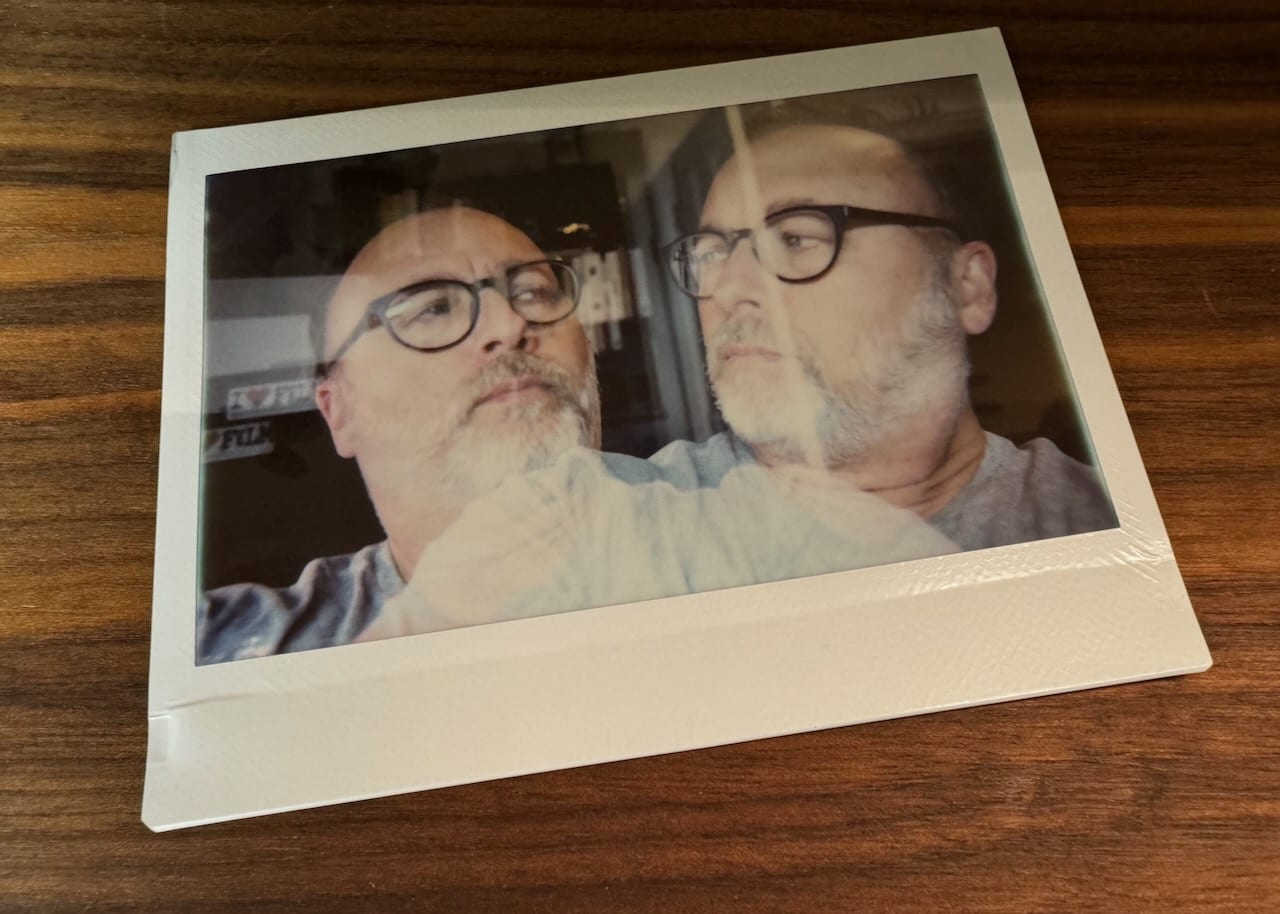
TIL: The Instax Wide does double exposures.
31 posts here have old image markup from some WordPress migration or another in the source files and they render poorly. I'm going to fix them, by hand, one at a time. Why do I change things all the time? What a hassle.
Look, I know I keep waffling on where to post things, and I’m sorry about that. There are simply too many good, viable options for writing things and putting them online.
Earlier today I wrote about using Tinderbox for blogging. Now, I’m writing this in WordPress Hugo, using its Gutenberg editor Emacs, which I very much dislike love. Thing is, WordPress is a good answer to the question, “If one was forced to choose a single tool for publishing all of my writing, what should it be?” It’s probably the best answer, but hoo-boy, how disappointing.
WordPress has everything one could need for publishing. It works well enough for anything. It has search, comments, stats, a massive ecosystem of plugins and information, good hosting options, etc. But dammit it’s still WordPress. It’s still overwrought. It continues to drift further from its blogging roots (full-site editing, blech!). And I swear, if I see one more “Upgrade to Premium!” notice in the dashboard I’m going to (╯°□°)╯︵ ┻━┻.
For grins, suppose that I just talked myself out of WordPress. What are my options?
Hugo. Powerful, fast, flexible, well-supported, and I have lots of experience with it. Lots of themes. Currently running baty.net. Free.
Tinderbox. Weird and wonderful. Infinitely flexible. Expensive (but I’ll pay for it whether I use it for blogging or not, so moot). Markdown is possible but requires swimming upstream. Difficult and fragile for blogging (at least for me it is). No themes or ecosystem around blogging to speak of. I’m on my own.
Blot.im. Simple. Super easy posting. Depends on Dropbox (or some other sync tool). Inexpensive. Well-supported by the developer (but only one developer). Can be slow. I’m not in control of the hosting environment.
Micro.blog. Great service. Easy to post. Sometimes unreliable. Nice set of tangential services. Uses Hugo under the hood, but I’m not in control over the server environment. Posts end up in the Micro.blog timeline, and I sometimes don’t want that. Great cross-posting. The editor is too basic, making longer posts less fun to write.
Kirby. Probably great, but I’m not going there yet.
After writing all this, it became obvious. I'm going back all-in with Hugo here at baty.net. I'm even going to try once again to post my daily notes here. Imagine what I can do if stop having to maintain multiple systems and just make writing and publishing baty.net as seamless as possible.
As much as I love Tinderbox, I'm wondering if it will continue to make sense long-term as a blogging engine. I get along great with most of Tinderbox's features, but export is one that has eluded me for going on 20 years. I can muddle my way through, but it's always a challenge.
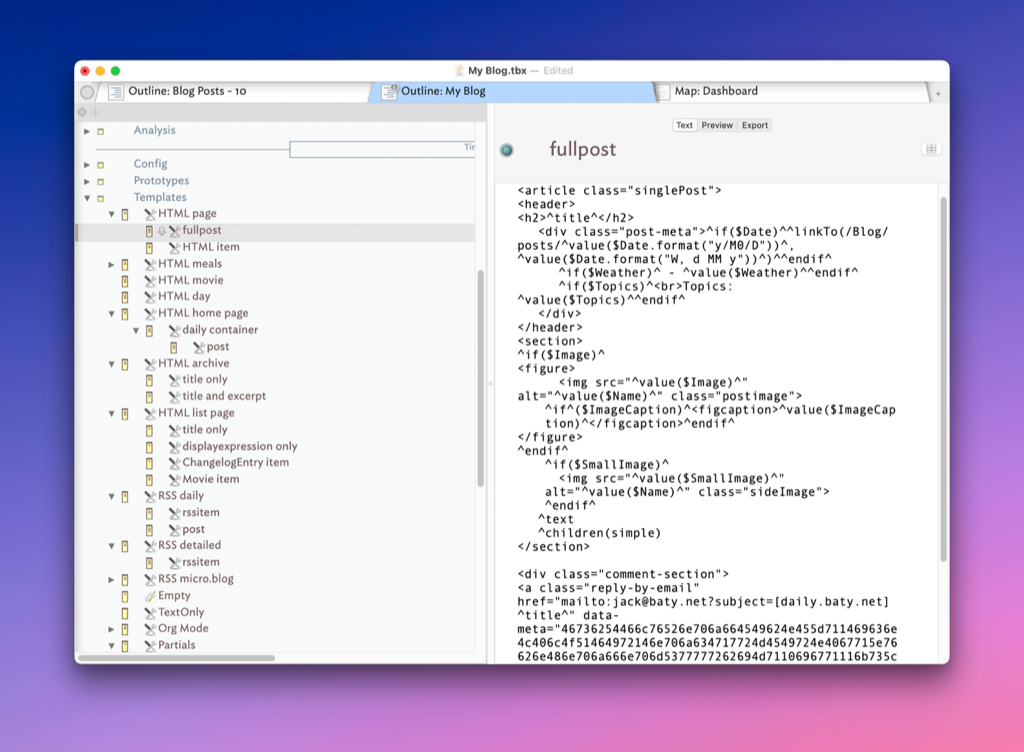
This blog's export templates have become complex enough that I don't want to touch anything, for fear of breaking something. The HTML/CSS is aging and janky, but the thought of updating it is daunting. I mean, look at this thing...
I kind of want to pick a theme and tweak a few things and be done with it.
Thing is, I like how this site works. I like the collected daily posts and I even like how it looks and reads. If I could stop overthinking things we wouldn't even be having this conversation.
But, I also want to consolidate and reduce the number of things I need to be "" at in order to get things done. I'm already good enough with Hugo and Blot and WordPress for blogging. If I could pick one or two of those and then just write, I feel like I'd be better off.
I want search and tag clouds and a consistent writing environment.
I still resent that at some point capital-D “Design” trumped usability on web pages. The most egregious example is link colors. Blue and purple links were deemed too “ugly” and were replaced by barely distinguishable variants. This blog’s theme, for example, removes colors from links by default. I’ve fixed that. It’s not as pretty, but at least you can easily tell where the links are (and which ones have been :visited).
Ok, technically I didn’t change every link. Only the ones within the posts. Otherwise, nearly everything would be blue and purple and even I can’t abide that much visual clutter.
I keep a lot of files in a lot of folders, but I’m inconsistent in how I organize them. This means I too frequently have trouble finding things, so I’ve made another attempt at fixing the problem.
I’ve tried all the popular “systems”. From PARA to ACCESS to Johnny Decimal, but everything has felt either too prescriptive or too loose. And they all felt like I was living in someone else’s space. I don’t want to memorize or check the “rulebook” to figure out where I should put something.
The systems that work best for me are the ones that fit my brain naturally. My brain works with digital files the same way it works with physical files. It likes folders. I use five six top-level buckets:
Inbox – New stuff that needs to be filed. Can come from anywhere, but I know it should be kept and saved somewhere.
Desk – This is where I keep my working files. Current projects, temporary stuff, and anything else I want within easy reach.
File Cabinet – When I’m finished with a project, I move things here. Anything I don’t need day-to-day, but may need to look up reasonably quickly. Recent receipts, software serial numbers, etc.
The Attic – Things I’ll probably not need, but one never knows, so I put them in the Attic. The Attic is for long-term storage of things I want to keep. Tax papers, auto maintenance records for cars I no longer have, etc.
Deep Space – This is new. Deep Space is where I put things I’m sure I’ll never need but can’t bring myself to throw away. My gas bill from 2007? It’s waiting out there in Deep Space. A letter I wrote to some company 10 years ago? Same. It’s a just-in-case for just in case.
Library – This is for things other people have written: Blog posts, ebooks, research articles, quotes, clippings, etc.
I keep everything except Deep Space files in DEVONthink. I use three distinct DEVONthink databases: “Jack” (because I couldn’t come up with a better name), which holds my Inbox, Desk, and File Cabinet files. I keep “The Attic” and “Library” as separate libraries because they tend to grow forever and it’s easier to sync, backup, and manage them separately.
Deep Space files are kept in a folder on my Mac Mini file server. Everything is backed up as part of my My Personal Backup System.
Within each of the folders, I use whatever organization scheme that makes sense.
“01 Desk” contains a “Projects” folder and some loose bits I want quick access to.
“02 File Cabinet” uses a simple version of Johnny Decimal, but I break the rules all the time.
“Library” is full of topic-based folders like “Environment”, “Technology”, “Politics”, and “Photography”.
“The Attic” and “Deep Space” are jumbled messes of folders and crap, just like a real attic.
It’s been pointed out that this is very PARA-esque. This is true, there’s a similar “flow” to things. My Archive is deeper, maybe. Maybe I should give it a catchy name and sell courses and ebooks! 😆.
Anyway, this structure is a slightly refined version of what I’ve always done naturally, before getting sucked into “Productivity YouTube”. I’ve formalized it a bit, but it’s what makes sense, so perhaps I’ll stick with it this time.
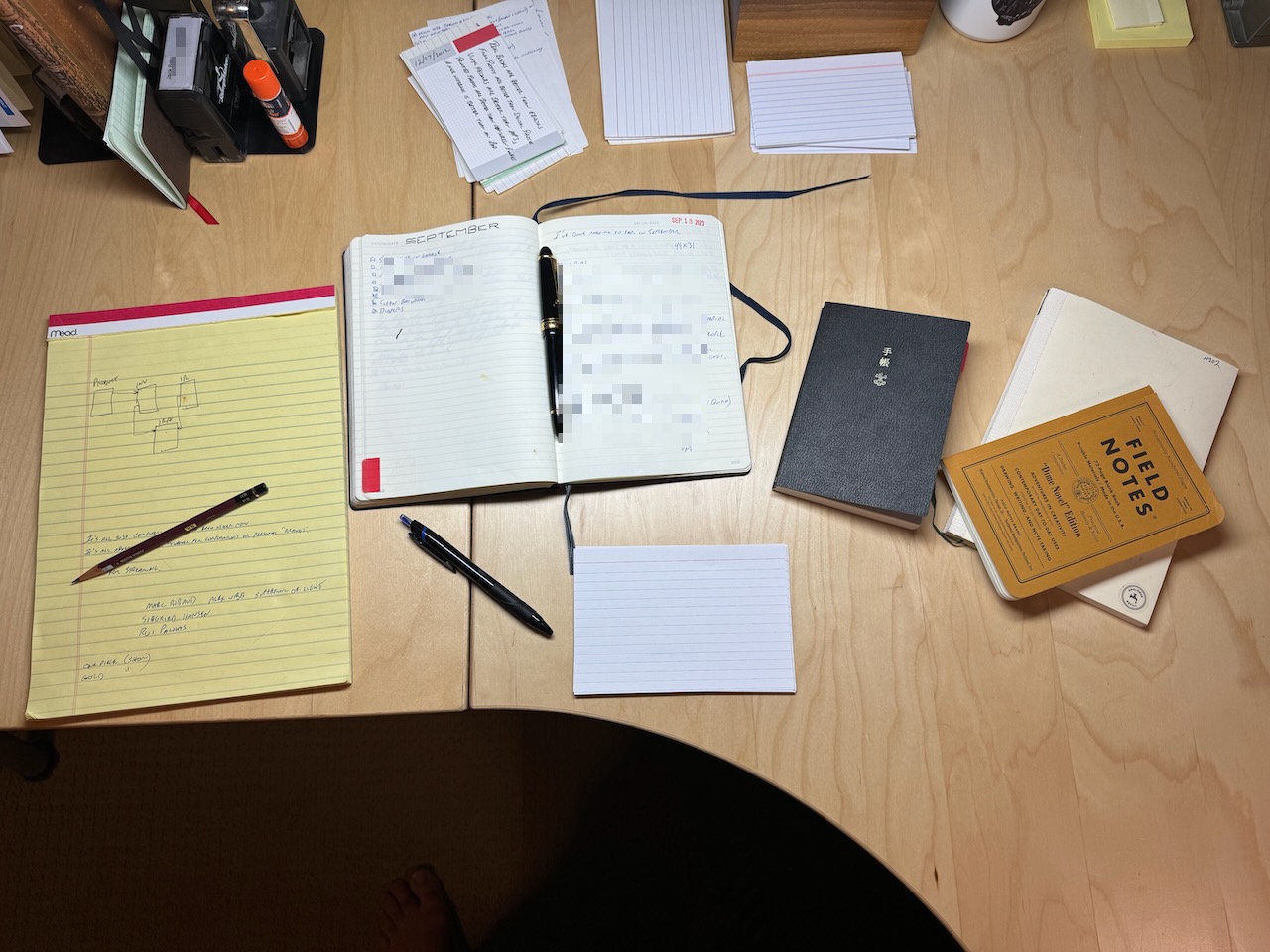
Hobonichi Techo. This is my calendar/planner. I keep appointments and important dates here. I also try to jot down a quick summary of the day or a small drawing representing something that happened.
Field Notes “Dime Novel” edition. I recently found this on a shelf and thought it too pretty to ignore. This is likely to become my next journal, even though I’ve cheated and started writing in it already.
Midori MD Notebook (lined). This is only for journaling. I like the paper and the 7mm lines.
Index cards. I can’t decide what goes on index cards, but I keep them everywhere, just in case. Usually, I write quotes on them so I can pin them to my bulletin board. I also have maintained a half-assed Zettelkasten on the cards, but that’s mostly died on the vine.
Is this too many? I don’t know. Some days it feels like a huge mess and I worry that I’m writing something in the “wrong” place. Other days, it’s perfect and I like having the options.
I like to record the weather in my journals. For several years, I’ve used https://wttr.in via curl. Recently, wttr is often unreachable or throws errors, so I took a look at weatherapi.com
Designed for developers by developers, Weather API is the ultimate weather and geolocation API
The free account limits are generous, so I created an account. The default JSON results are very thorough. I created a little shell script that uses jq to parse the JSON and returns only the high/low temps and a text summary of the forecast:
Could I too start storing things as email and find them later using Notmuch?
So far, I’ve solved RSS feeds. Rather than reading feeds in NetNewsWire or Elfeed, I’m using rss2email to convert RSS feeds to emails and reading them in Notmuch.
The tricky part of rss2email is actually sending the emails. I eventually got things working using msmtp, which would have been fine, but it’s a lot of extra hoohah. If only I could save the RSS items directly into Notmuch. Guess what, I can!
rss2email supports writing to Maildir files. It was as easy as adding the following to my rss2email config:
rss2email supports importing OPML files, but I decided to clean things up and add feeds one at a time, like this:
r2e add BatyBlog https://baty.blog/feed.rss
Then, when I want to read my feeds I run r2e run and everything ends up right in Notmuch. I don’t want them tagged with “inbox” along with my real email, so I added a filter to the post-new hook in Notmuch.
notmuch tag +feed -inbox -- '(from:jack+rss@baty.net)'
I have the rss2email sender configured as jack+rss@baty.net so it’s easy to filter just those messages. With that hook, new RSS feed items do not appear in the inbox, but I can easily read them in Notmuch by searching for tag:feed AND tag:unread.
So there, I’ve moved my RSS feeds into emails and manage them via Notmuch.
 baty.net