 baty.net
Before I went out of town yesterday, I mentioned that I might be moving back to Hugo from Ghost (again). I wasn't sure I'd actually do it, come the light of day, but I did it.
Saturday, July 12, 2025
Blogging with Ghost and using Ghost's ActivityPub features is a fine setup, but I can't seem to get comfortable with it. There's this feeling that it's not "mine" that I can't shake. Also, the ActivityPub stuff is functional, but not nearly finished. Blogging with a static site generator (e.g. Hugo) can be frustrating, but it's what feels right. And "real" Mastodon is still a much more consistent and complete experience. So, I'm back in Hugo for baty.net and my @jbaty@social.lol identity for socials. You all knew it would happen, though, right? I gave it a month this time, at least.
I swore off Evil-mode in Emacs a while ago. It often feels like a kludge and some packages I use, namely Howm, don't work with it at all. But I still spend time in a terminal, terminal apps, and Vim, and bouncing between Vim and Emacs bindings is crazy-making and I'm not enjoying it.
So my little essay about the computer, why I'm not going to buy a computer, was just a part of my strategy to try to keep myself whole as a human being. I don't want my life to be lived for me by a machine."
-- Wendell Berry, referring to his 1987 essay, "Why I am Not Going to Buy a Computer"
I just want to choose a service without feeling like I'm also committing to an ideology.
I can't seem to read fiction anymore. Every time I pick up one of the novels I've started recently, I find myself saying, "Don't care." and I put it back down. Non-fiction is faring much better.
A little TUI for updating exif data in photos
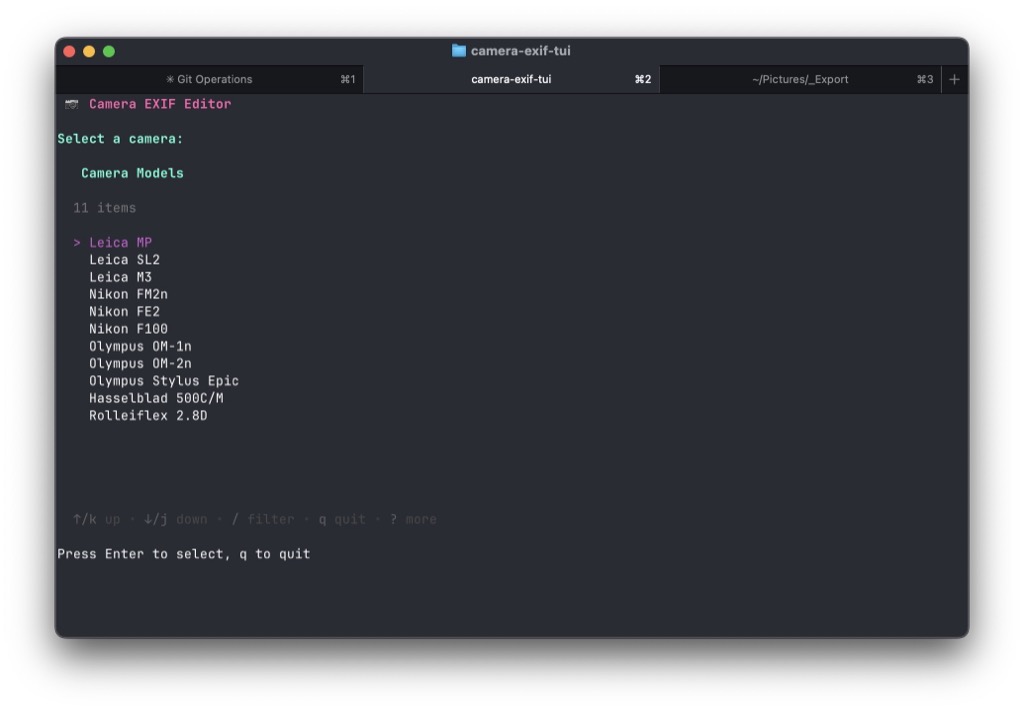
I like to have Make and Model information available in film scans, and use exiftool for this. I have a lisp function in Emacs that does this, but sometimes I'd like to do it from a terminal instead.
So I asked Claude for help. The result was camera-exif-tui. It's a tiny Go app that launches a TUI that allows me to select a make/model and a folder full of image files. It calls exiftool and updates the images with the selected camera info.
There's a cameras.yaml file in ~/.config/camera-exif-tui/cameras.yaml with my cameras configured.
cameras:
  # Leica Cameras
  - make: Leica
    model: MP
  - make: Leica
    model: SL2
  - make: Leica
    model: M3

  # Nikon Cameras
  - make: Nikon
    model: FM2n
  - make: Nikon
    model: FE2
  - make: Nikon
    model: F100

  # Olympus Cameras
  - make: Olympus
    model: OM-1n
  - make: Olympus
    model: OM-2n
  - make: Olympus
    model: Stylus Epic

  # Hasselblad Cameras
  - make: Hasselblad
    model: 500C/M

  # Rolleiflex Cameras
  - make: Rolleiflex
    model: 2.8D
These quick, handly little scripts are ideal for AI. People seem to ignore this when railing against LLM use. The whole thing, including writing the README file and setting up the git repo took less than an hour. I would never have bothered with this without something like Claude. It was fun! I don't want to learn the details of Golang, but I'm happy to tweak whatever Claude spits out. Now I have something that I wouldn't have had before, and it was easy to do. I don't care if it's "correct" or not. It works for me.
Ghost is nice, but it still makes me feel like I'm living in someone else's space. There's a sort of background hum of "this isn't really yours", and it bothers me. I haven't decided yet if it bothers me enough to do anything about, though.
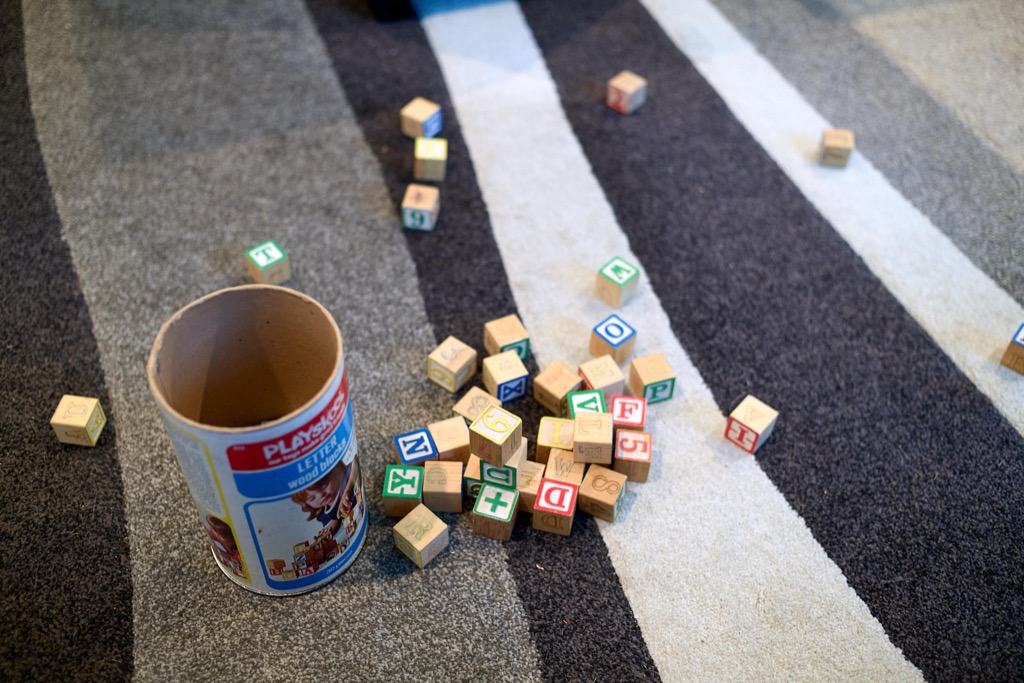
I find that I'd much rather look at these janky Polaroids than any super-sharp-and-clean hi-megapixel digital image.
It's funny how when I move something for like the fifth time, I think to myself, "There, now I never have to move that again!"
Duplication

Here are some (probably) unnecessary things I've been doing.
For posting to baty.net, I first create the post as a Markdown file in Emacs for the Hugo version of the blog. Which, as of today, I'm not even using. Then, I copy the rendered post from a browser and paste it into a new post in Ghost's control panel for publishing.
I tell myself that this is so I have a local, plain-text copy of my posts. While this is true, it's also so that I have a Hugo-ready copy of everything, for when I inevitably switch back to Hugo from Ghost.
Another case of duplication involves photos. I edit photos using Capture One, where I use "Sessions" rather than their catalogs. For my main catalog, I've been relying on Apple Photos. Whenever I finish editing photos, I export a copy to Photos. As a result, I have many photos—some, not all—stored in two places. I don't see a way around this duplication, as I prefer not to use Lightroom, and Capture One's cataloging features are lacking.
For personal journaling, I've used Org-journal in Emacs for years. However, there's nothing like Day One for dealing with photos, geolocation, and resurfacing past entries with the "On This Day" feature. Plus, mobile.
So I've continued using Org-journal, but at the end of each month, I import the entries into Day One.
What else? Oh, right, speaking of journaling, I try to write in my paper notebooks every day. This is like meditation for me, and I adore having the handwritten artifacts. Except I'd like certain things to be easily searchable, so I rewrite(type) those entries into Org-journal. So yeah, now there's 3 versions of some stuff.
Anyway, I don't know if there's anything I want or need to do about all this, it's just something I noticed.
I've noticed that I've started posting things with an eye toward getting more attention online, and I hate myself for it. Might be time to pull back for a bit.
Why can't they make players with big, obvious, differentiated Play/Pause/Stop buttons. My CD and Blu-ray players require a magnifying glass and a flashlight to find the right buttons.
Here's a stupid idea I'm thinking about trying. What if I were to write all my posts in Emacs and render them locally using Hugo. Then, copy and paste the rendered HTML into the Ghost editor for publishing? A bonus with that approach would be that when I inevitably end up back to using Hugo for the blog, all the content will already be there 😁.
I've been using my new MacBook Air for a few days. I just now did a search (using Google, by default) and noticed that I'd not yet installed the Kagi extension. If I didn't notice, I must not have missed it, so I canceled my subscription.
Sunday, June 29, 2025
Just seeing if this thing still works.
My updated computer setup
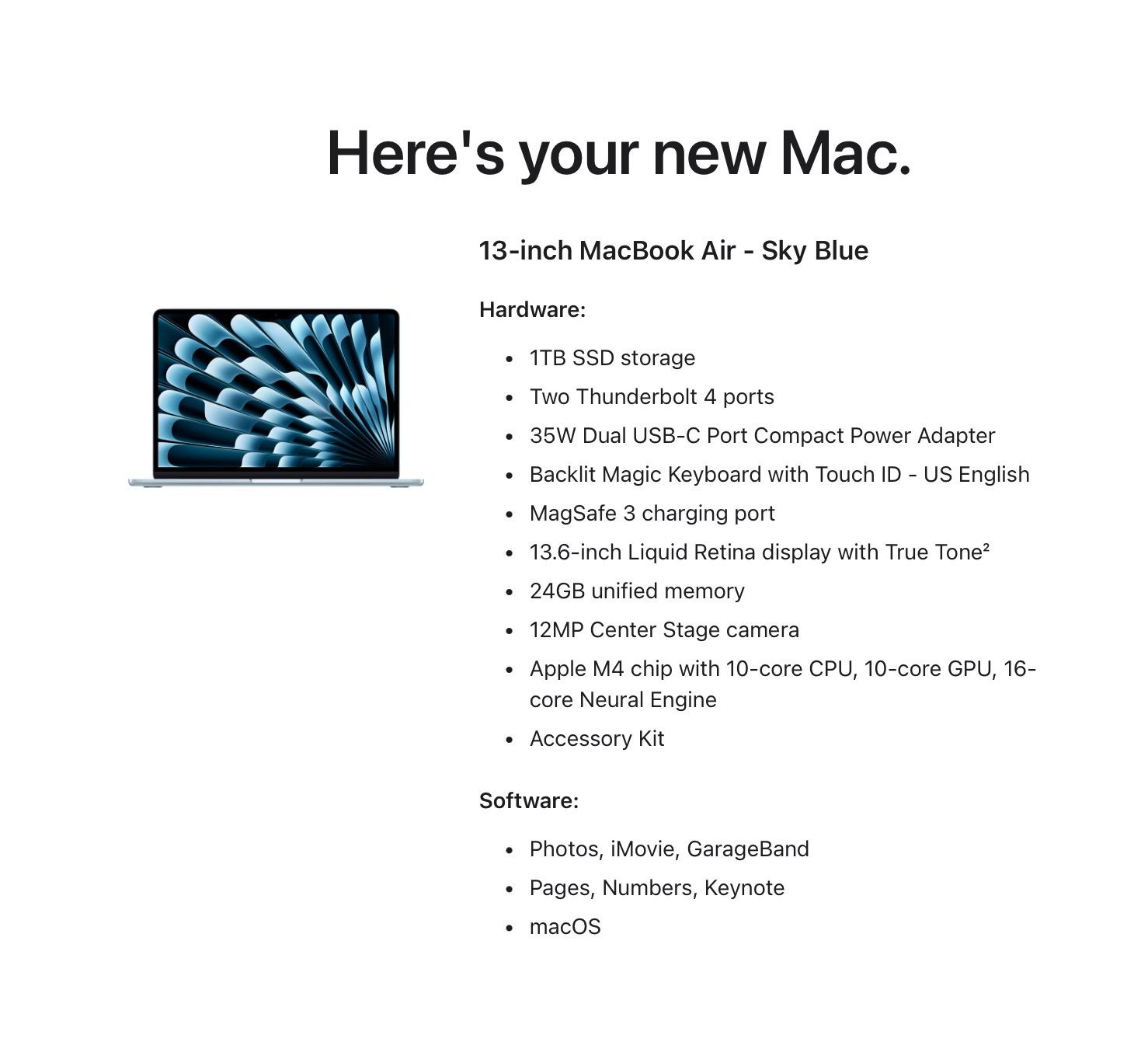
The plan was to only use one computer so that I could stop thinking about syncing and software updates and backups and so on. That one computer needed to be portable. I had a 2021 MacBook Pro, but I traded it in for a new M4 MacBook Air (w/24GB and 1TB HDD). The MBP is still perfectly fine, but I wanted newer and smaller/lighter. I set the Air up "from scratch", and, after a few painful days, it's starting to feel like a usable machine that has most of my "stuff" on it.
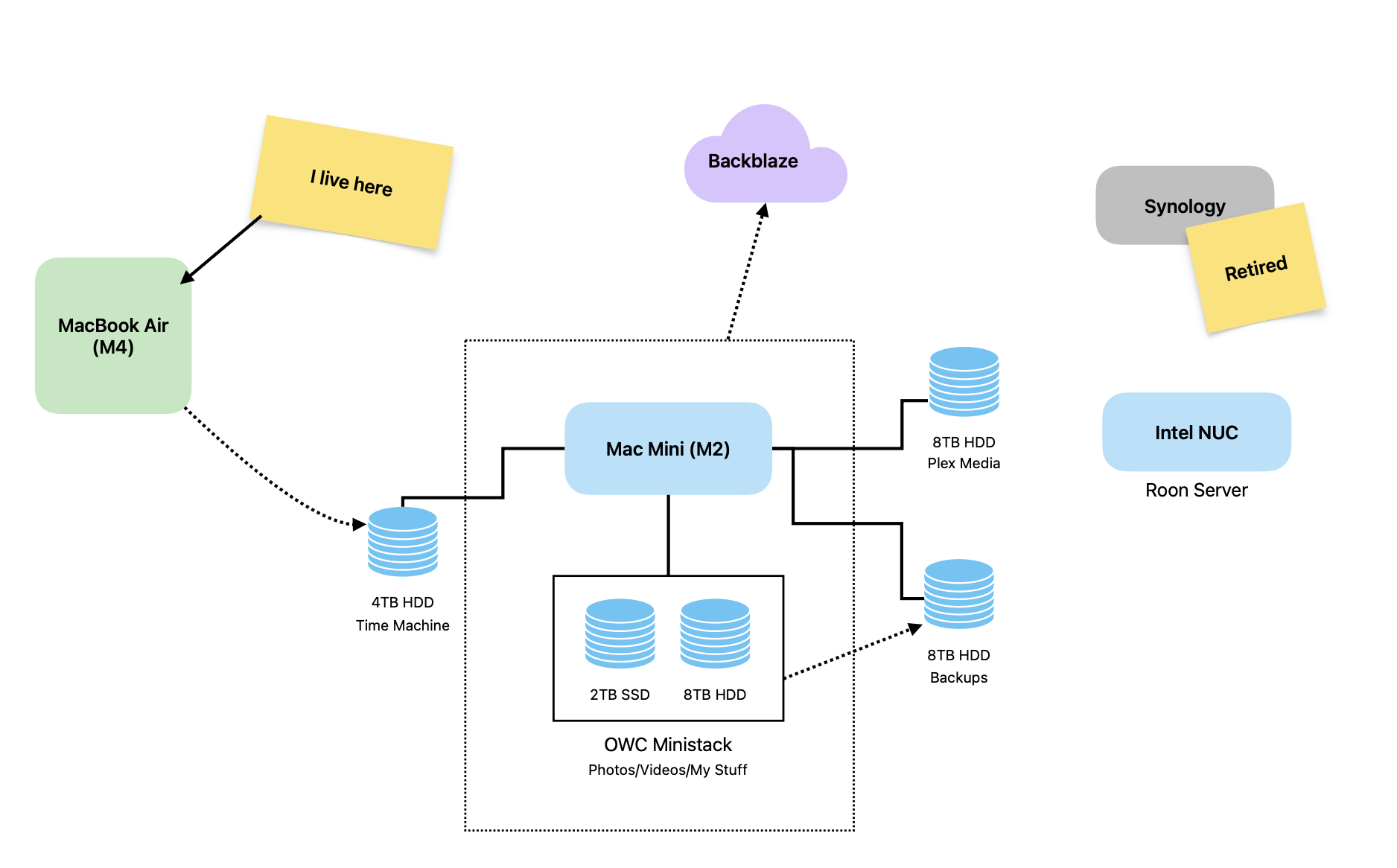
My "One Computer" setup involves several computers 😁.
- MacBook Air (M4) - Primary
- Mac Mini (M2) - Home server
- Intel NUC - Roon server
- Synology - (retired)
The Mac Mini (M2) has been moved into a home server role. The Mini has an OWC Ministack enclosure hanging off it loaded with a 2TB SSD and an 8TB HDD. These drives contain all my RAW files/videos/archives/etc. Both drives are a just little over half full, so I have some room there. I decided to renew my Backblaze subscription and have it back up the Mini and both the drives in the Ministack. It's $100/year to have all my important stuff backed up remotely. Even though I still clone the backup drive to another HDD and carry it offsite manually, Backblaze is a good value for the size of the backups and the piece of mind it brings.
There are 3 other drives attached to the Mini...
There is an 8TB HDD, to which I copy everything from the Ministack every night using Carbon Copy Cloner. These are my local backups.
To avoid having to plug an external drive into the Air for Time Machine backups, I attached a 4TB drive to the Mini for use as a Time Machine drive.
And finally, the Mini is home to my Plex server, so I plugged another 8TB HDD into it for Plex media. So far, this drive is not backed up anywhere. I could include it in the Backblaze backups, but it just seems like too much. Honestly, if I were to lose that drive, I wouldn't be out anything I couldn't replace. It's not like I throw my DVDs away after ripping them. 90% of everything is available for streaming anyway. Plex is more because I like how it feels to play movies from inside the house.
That leaves 2 other computers on my shelf.
There's a little Intel NUC running my Roon Core. It's been running flawlessly for years, so I'll leave it be until it dies. The actual music files are backed up elsewhere. If it dies, I'll install Roon on the Mini and that will be one less computer to think about.
I'll be retiring the Synology. It's going on 10 years old and at this point it's redundant. What I may do is pull the (2) drives out of it and put them in a cheap enclosure with RAID for my Plex media. I know, I know, RAID Is Not a Backup™, but it's better than a single drive on its own, and we've already established that I'm not too worried about it.
One flaw I see here is that there's no explicit offsite backup of the Air. Nearly everything on that computer is synced via iCloud, so I'm not too concerned about this yet. Technically, I'm not down to "One Computer", but the goal was to only use one computer, so I think I'm good.
One Computer

I spend most of my computer time at the Mac Mini (M2) on my desk. I also have a 2021 MacBook Pro that I use occasionally, when I'm looking for a change of pace.
If I only used the stock Apple or cloud-based apps and didn't do anything fancy, having two computers would be fine, but I do neither of those things. I tweak the shit out of everything all the time. This means copying configuration changes between both machines. Sometimes this can be done via iCloud or symlinks or something, but it's still something I need to think about.
Other things I deal with when using multiple computers are: backups, Homebrew installs, OS and application updates, software licenses, etc. I have a whole routine that I run weekly on both computers.
Yesterday, there were suddenly dozens of Syncthing conflicts I needed to sort through. Syncthing normally runs like butter, so this was an unwelcome surprise.
I started thinking about all these hassles and how they'd mostly disappear if I only had one computer. So, that's what I've done.
I got everything up to date on the MBP and unplugged the Mini. I have two USB-C docs attached so that all I need to do to connect the MBP is to attach the MagSafe connector and one USB-C cable. I run docked and in clam-shell mode 75% of the time, so popping it in and out doesn't happen much anyway.
The current plan is to move the Mini to a "Network File Server" role, which probably just means Plex. I'll retire the 10-year-old Synology. Technically, I'll still be dealing with another computer, but that's fine. Using two computers for the same things is the problem.
Part of me wishes that my One Computer could be a nice, repairable Linux (or even *BSD) laptop, but that's just not feasible. I'm a Mac guy for now.
UPDATE: My One Computer is about to be an M4 MacBook Air...
Importing Org Journal to Day One
I wanted a different view into my org-journal history, so I imported it into Day One
Plain text is great, but has limits. I've been journaling in plain text (.org) with org-journalsince 2018. It's just a bunch of .org files in a folder. It's great, and, you know, future-proof.
Before Org-Journal, I used Day One for journaling as far back as 2011. Day One is pretty, powerful, and available everywhere. There are "on this day" and "today" features that I find useful. It integrates smoothly with the Photos app, and it stamps entries with the current location and weather conditions. Add fast sync on all devices with end-to-end encryption, and it makes for a darn nice journaling setup.
I thought it would be nice if I could pull my org journal into Day One. This would give me a nice way to peruse my history that doesn't involve regular expressions 😁.
I asked Claude for a shell script that would use the Day One CLI tool to import my org-journal files. With one small tweak, it worked the first time. Here's a gist with the shell script.
The script pulled in 1,315 org-journal entries into a separate "Org Journal" Day One journal. Pretty cool.
Recently, I've been journaling with Journelly, which is a nice, simple journaling app for iOS. The killer feature for me is that Journelly stores my journal as an .org file. This means I can also create journel entries right from Emacs on my Mac. My next trick is going to be importing Journelly entries into Day One the same way I did with org-journal.