A (small) improvement to photo display on Glass.photo

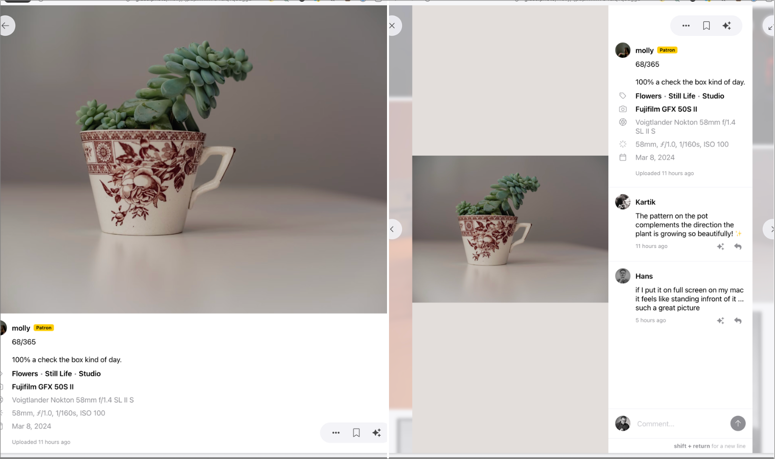
I don’t like the way Glass shows images in a desktop browser when the browser window is wider than around 1,000 pixels. I prefer the layout in narrower windows, but I never have mine that narrow. This means whenever I’m browsing Glass, I have to shrink the window.

Left: What I want. Right: What I get

The Arc browser has “Boosts” that let me easily adjust the CSS of any website, so I created one for Arc. This is it:

.lg\:flex-row{flex-direction: column !important;}

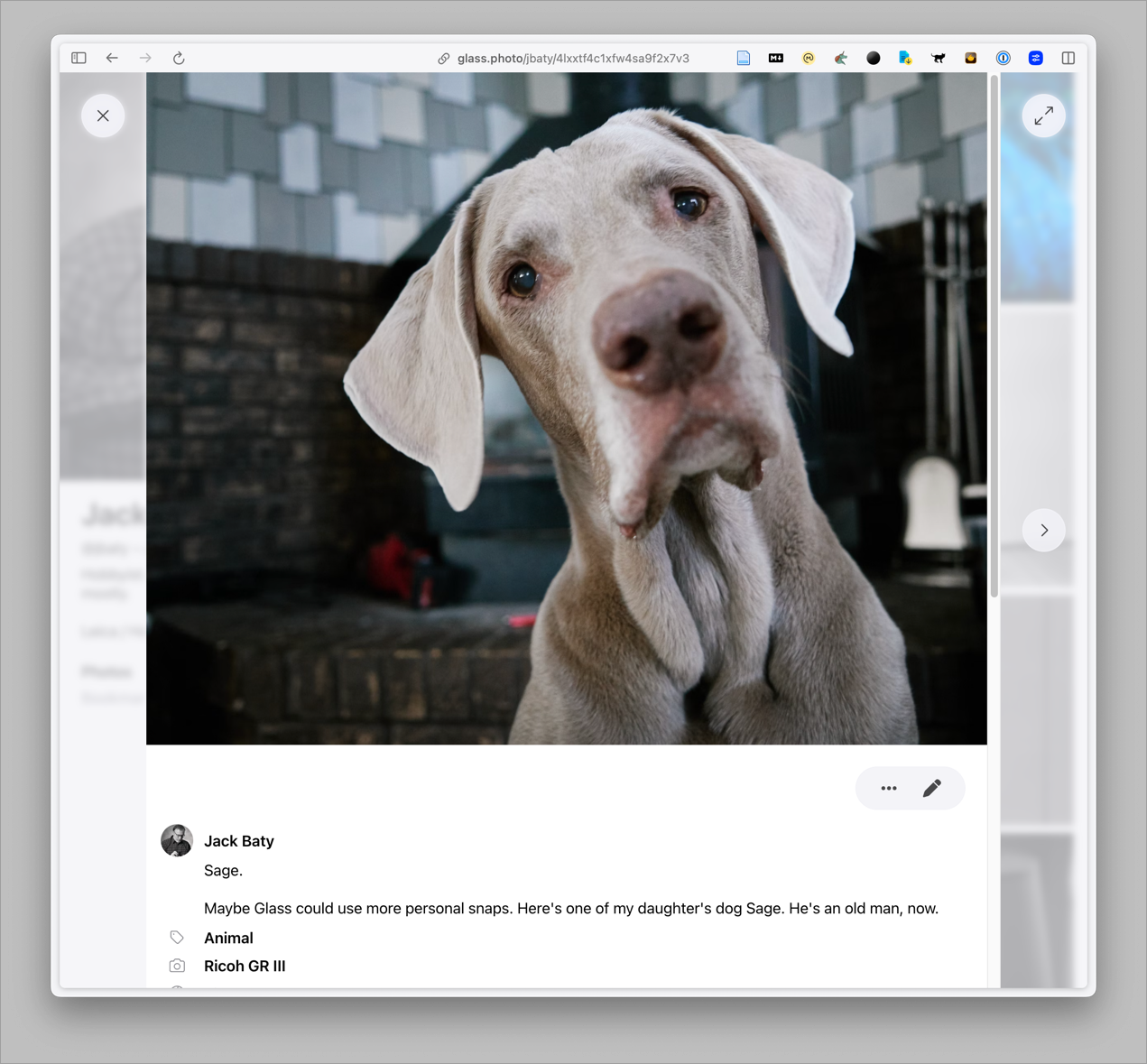
Here’s the result:

A decent improvement

This will do for now. I’ve written the Glass folks asking if there is a reason for the side-by-side default layout because I’d like to never see that layout.

Permalink #

From MacBook Pro to Mac Mini

This morning it took over 30 minutes to copy a 70MB file from my MBP to the Synology over WiFi. The wait resurfaced my thoughts about having an always-on computer on my desk with some fast, attached storage.

I just ordered an M2 Mac Mini (Pro) with 16GB RAM and a 512GB internal drive.

Since 2021, I’ve had an over-spec’ed MacBook Pro (M1 Max) with a 2TB internal drive and 32GB of RAM. I don’t do much that requires all of that oomph, but I figured it was nice to have anyway. With the Mini, I went with the Pro version mostly for the additional ports. A smaller, 512GB internal drive should be fine, since I’ll have a number of fast SSDs always attached. I’m not worried about not having enough room for my stuff. The thing I’m most worried about is “only” 16GB RAM. I’ve had 32GB for so long that I don’t remember what it was like working with less. I’m almost certain that 16GB will be plenty for my purposes, but it still makes me a little twitchy. Plus, $1,299 still feels like relatively cheap compared to the $3k+ I spent on the MBP.

The hardest part of all this will be that, since I’m keeping the MBP for mobile use, I’ll now have two Macs again. Consolidating to one machine a few years ago was such a breath of fresh air. I no longer had to worry about keeping configs updates or which folders needed syncing, etc. Now it’s all back.

Keeping things synced means worrying about which apps I use, or don’t, and if they sync by default or need to be set up to do so. My org files are all in ~/Documents/org now so iCloud should take care of that[1]. However, my emacs configuration is in ~/.config/emacs. I’ll once again have to manage my .config files, which has always kind of sucked. I really don’t want to symlink everything and I really don’t want to go back to finding some “clever” method of managing them. The answer, I think, is to use fewer things that need configuring. Good luck with that, Jack.

The next step will be to figure out my storage options. I’m thinking I’d like some sort of Thunderbolt RAID thing with some SSDs inside. And also my existing backup drives. Oh, and Time Machine, for good measure. If you’ve found something you like, I’d love to hear about it.


  1. I’ve experience few issues with iCloud, so this doesn’t worry me 🤞 ↩︎

Permalink #

Perfect Days (2023)

Hirayama seems utterly content with his simple life as a cleaner of toilets in Tokyo. Outside of his very structured everyday routine he enjoys his passion for music and for books. And he loves trees and takes photos of them. A series of unexpected encounters gradually reveal more of his past.

Perfect Days was just beautiful, and exactly what I needed. I loved every simple, slow-moving moment of it.

Permalink #

Nuke & Pave - the half-hearted edition

"Nuke & Pave" typically means wiping a computer's hard drive and installing everything from scratch. That's not what I'm doing (although it is tempting). What I'm doing is more like a precision strike. (I'll stop using military analogies, now. They're gross.)

Things get out of hand, and when they do I need a reset. Right now my blogs, email, file-storage, and note-taking are all very much out of hand. I'm writing this post as a way to sort it out in my head.

Blogging. I've been posting to four websites for a couple of weeks. It starts innocently enough, but then I get to a space where I want to write something but don't because I can't decide where it should go. I'm dropping everything but the wiki and this blog at baty.net.

Email. OMG Mutt is so great. So is Notmuch and Mu4e and even Apple Mail. I've been switching between them for a while now and it's done nothing but mess with my muscle memory and cause weird sync issues. I don't get that much email, so I'll be dropping back to Apple Mail in the near term. I'll still be running mbsync daily just to have a nice local Mailbox copy of all my mail.

Note taking. Good grief, it's been a rough couple of weeks on the note-taking front. Face it, I'm an Emacs guy. I've been an Emacs guy for more than a decade. And yet, I found myself spending many hours installing and configuring NeoVim and LazyVim for some reason. It's not completely crazy, as I still use Vim as my $EDITOR, but that's only for popping in and out of simple text or config files. I need to stay in Emacs. I'll keep the Vim stuff around because I've done all that work, but there's no way I'm going to live there. And Obsidian can fuck right off.

I got mad recently because I wanted to jot something down and didn't know where to put it. I launched Obsidian because Daily Notes work great there. Stop it! To help avoid that urge, I've added some quality of life improvements to my Org-mode/Denote setup. Let's hope that works.

I don't know where this leaves Tinderbox. Still noodling on that one.

Otherwise, my notes go in Denote files using Emacs or in TiddlyWiki.

File Storage. This one I haven't dealt with yet. I have files scattered everywhere and it's crazy-making. There's the Synology with my archives, but there's also the Mac Mini with what was going to be my Archives until I chickened out. Now there's some files in both places and some in one or the other. Not cool. I'm currently leaning toward punting on the Mini and putting it all back on the Synology.

There are a few more areas that need a reset. I'll get to them later.

Permalink #

Whatever happened to my junk drawer?

In a post from 2013, Digital Recordkeeping, I summed up my tools like this:

Tinderbox is my notebook. Evernote is my junk drawer. DEVONthink is my filing cabinet.

I was onto something back then. It has occurred to me is that I no longer have a dedicated tool to use as a Junk Drawer. Why is that?

I guess what happened is that DEVONthink became both my file cabinet and junk drawer. I'm now thinking this was a mistake. DEVONthink is for carefully filing things I know I want to keep. It's for organized, longer-term storage. Things like tax documents, journal scans, etc. It shouldn't be used as my save-as-pdf-for-(maybe)-reading-later system. That way leads to chaos, which is what I have now.

What does a junk drawer app need? I'd say fast, easy capture along with good search are the most important. It should be lightweight and allow for different ways of getting stuff into it, based on context.

Some might say that a simple set of folders in the filesystem should work. They're right, it could, but that's still too much friction. I want to grab web pages and images and snippets of text from everywhere and just pour them into something. I'm probably not going to organize anything, so a way to see what's new and a search would be great.

At some point I standardized on DEVONthink rather than the simpler EagleFiler for my archives. EagleFiler is great, though, and I'm thinking it would make a terrific junk drawer. I can capture things using its built-in F1 universal capture shortcut. There's also a dedicated inbox folder that gets sucked into it automatically. And EagleFiler is really just a wrapper around a set of folders, so it's easy to back out.

I miss having a dedicated junk drawer. I think EagleFiler is worth a try.

Permalink #

Creating a WARC web archive using wget

I’ve been tinkering with keeping offline copies of websites (mostly mine), and have always used either wget or httrack. I wasn’t aware of the WARC format until recently, so I thought I’d try creating a few WARC archives.

wget, as it happens, has WARC support built in via the –warc-file option. I added that to my usual set of switches and put it all in a shell script, like so.

#!/bin/sh
# warc-archive.sh https://example.com warc-file-name

wget \
	--mirror \
	--warc-file=$2 \
	--warc-cdx \
	--page-requisites \
	--html-extension \
	--execute robots=off \
	--directory-prefix=. \
	--wait=1 \
	--random-wait \
	$1

This creates a compressed, self-contained WARC file along with a mirrored set of files comprising the entire site.

Actually reading the WARC files is the tricky part. As far as I can tell the easiest way is using Replay Web.page. Drag the website.warc.gz file into the browser and from there you can search for documents, images, etc. and browse the site completely offline.

It’s a little convoluted and I’m still confused about what goes where, but it seems pretty handy having a single-file, self-contained, offline archive of an entire website.

Permalink #

Additional backups

Derek Sivers posted about how he handles backups and it got me thinking about how I handle backups.

I feel like I'm mostly covered. I use Backblaze on my MacBook Pro for continuous, off-site backups of both the internal SSD and the attached "Media" drive containing my photos, videos, etc. I clone "Media" to a separate external drive once a week. iCloud syncs my ~/Documents and ~/Desktop folders, so that should be covered. The headless Mac Mini is also using Backblaze. The Synology is synced nightly to Backblaze B2 storage.

I don't worry too much about losing stuff. And yet, it sometimes feels a little abstracted. A little too magic. This is where Sivers' piece resonated. I dig rsync and use it for pushing local website changes out to servers all the time, so I decided to also use it mimic parts of Sivers' simple routine.

For remote storage, I spun up a 5TB Hetzner Storage Box. Cost is around $10/month. They really are just dumb servers you can access via (S)FTP or SSH. Then I wrote a couple of tiny shell scripts that wrap rsync.

As an added measure, the script can also rsync to an attached thumb drive, so I'm doing that, too. The scripts back up slightly different things to the storage box vs the thumb drive, depending on "importance".

Now I can type "bkremote" or "bkstick" and I have a complete snapshot of (most of) my stuff, one local and one offsite. The nice part is that I can easily get at all of it. No need to log in to a service or unpack weird backup files. It's an exact mirror. The down side is that it's an exact mirror. No history or versioning. If I delete something locally, then sync, it's gone everywhere. I'm ok with this since it's just an adjunct to my current system. But I'm happy to hear about anything that I might be missing.

Permalink #

No longer keeping my notes in a Git repo

For many years I’ve put every new folder full of anything into a new Git repo. I never questioned it, I just did it because that’s what you do.

I’m thinking about no longer doing this. This morning I was daydreaming while waiting for a folder to finish rsyncing to a server and I was mesmerized by page after page of lines like “.git/objects/fb/70e546350cc4106caf1225706b44c85087ed27” scrolling by. I checked a few of my projects and was surprised by how much space all those .git/ directories use.

Do I even need them? I’m thinking no. I can’t remember the last time I went back and looked at earlier commits or needed to diff anything that wasn’t actual code. My ~/org files don’t need precise version control, they just need good backups. Static websites probably need Git because it’s nice for tracking template/CSS changes. Also, I’ll need it if I ever decide to use Github Pages for hosting, etc.

So I’m considering going through my project folders and removing .git/ directories unless I actually need Git.

Permalink #

Software that sparks joy

I’m just coming off a week using Obsidian. Obsidian is really good and powerful and easy to use and extensible and probably the correct answer to the question, “Where should I keep my notes?”.

I love Obsidian for a minute because of what it does and the fact that it’s not whatever I’d been using previously. It’s refreshing and finding new plugins to play with is good fun. But it’s janky. Why don’t more people complain about it being janky? It’s just blech to actually live in. It feels weird and loose and sloppy to me.

I don’t enjoy using Obsidian. At all. It sparks zero joy.

The whole Kondo-ian “Sparks Joy” thing is cliche by now, but it’s a useful guage for measuring the long-term viability of a thing.

So, what software sparks joy for me? Here are a few recent examples.

Tinderbox has been sparking joy for me since the early 2000s. It’s a powerful outlining, concept mapping, note taking, timelining, researching, and publishing tool. Its author is thoughtful, helpful, and continues to improve Tinderbox in meaningful ways. The community is smart, very helpful, and spends its time solving real problems rather than competing in the PKM influencer space.

TiddlyWiki is weird and fun and clever and I’ve dumped nearly 4,000 notes in my public wiki at wiki.baty.net. It is a single HTML file that runs in a browser. It has a weird but powerful internal scripting language. It’s a sort of Quine in that it uses itself to make itself. I often consider other tools for creating this sort of knowledgebase, but TiddlyWiki is too fun so I continue pouring stuff into it.

Emacs is of course something I dig probably more than anything. What’s not to like? It’s free, old-school, infinitely extensible, wildly powerful, and as nerdy as it gets. I have ten years worth of my “stuff” in Emacs (mostly as Org-mode files). I can make Emacs do anything. And writing Org files in Emacs is such a pleasure. The text feels “tight”, you know? Not like Obsidian. I’m writing this post in Emacs in markdown-mode and holy cow it’s a nice way to write. I sometimes try to stop using Emacs because I get “tool-sick”, but it rarely lasts more than a week. So much joy.

Those are the top 3 joy-sparking apps at the moment. Others include CurioBBEditThingsCleanShot, and certainly more that I’m forgetting.

Software can be so much fun. Too much, maybe, as it becomes a distraction and constant cause of churn in my brain. But fun is fun and joy is joy and what could be wrong with that?

Permalink #

Fending off the Futz Monkey

Mike Hall's daily notes resonate with me again with a post (mostly) about futzing with stuff. It's like he's in my head when he writes about "keeping the futz monkey off my back."

I'm in my version of a similar place. For example, yesterday I posted to or updated four different websites. Each of them managed using different and unconventional software. There's Tinderbox, TiddlyWiki, and Kirby CMS. Another is just static HTML/CSS. They all depend on a pile of custom templates, scripts, and sloppily-documented setup. They work, but what if they don't? I'm not always in the mood for fixing things that break when I touch them wrong.

Those four sites are run on two different servers, one Ubuntu and one OpenBSD. I had this idea of moving all of my stuff to the OpenBSD instance, but I spent hours trying to get Kirby/PHP running under the built-in httpd server and failed. Caddy is so much simpler, and I'm familiar with it, so I'm this close to dumping the BSD box and pulling everything back to Ubuntu.

Always choosing the clever option makes for so much extra work. Too much.

Speaking of clever, Emacs and Org-mode are super clever. Maybe too clever for my own good. I probably spend three or four hours a week futzing with my Emacs setup. It's fun, though, right? Yes, it can be fun, but it's also unnecessary. I mean, it's for notes, right? I could use anything for that, but of course I've chosen the clever option again.

The draw of Emacs is that I have convinced myself that since I can do nearly everything in Emacs, the time spent making it look and act just the way I like it is worth the effort. Maybe it is, but it's still a lot of time spent.

It's not entirely Emacs' fault. I could move everything to, say, Obsidian and then I'd just futz with that instead. But maybe not as much? I don't know. Sometimes I switch tools because I've convinced myself that I'm actually simplifying things. This is a convenient lie. On the other hand, the Futz Factor of even something as tweakable as Obsidian is a lot lower than that of Emacs, so I try it (or Logseq, or NotePlan, etc.) every few weeks or months. It never lasts, even though one of those is probably the correct answer. Or would be if I actually enjoyed using any of them for more than a few days.

Ideally, I'd use tools with the lowest possible futz factor, but the futz monkey is a sneaky bastard, so the best I can hope for is something with an acceptable blend of simplicity and futzability.

Right now maintaining multiple blogs is not the right amount. Neither is Emacs. I don't have the energy to figure out why CTRL-e doesn't do what it's supposed to in Emacs. I don't feel like running different servers with different operating systems and web servers. I don't feel like futzing with all that all day, which is what I've been doing for some time now.

So, you'll probably see me writing exclusively here at baty.net and putting notes about stuff into the wiki and THAT'S IT! I'll move sites from OpenBSD back to the Ubuntu server. I may even fire up Obsidian again. It sounds a lot like futzing, but I've convinced myself that it's the best way to avoid futzing. Take that, you stupid monkey!

Permalink #

A brief flashback into Lightroom

For some reason I've been thinking about installing Lightroom again. Of course earlier this year I decided that I was only going to use Capture One and I completely uninstalled everything from Adobe.

I prefer Capture One "sessions" to its catalogs because cataloging in C1 has always felt janky and slow to me. Sessions are great at the point of ingest and initial edits, but become cumbersome later when just wanting to peruse my library.

Lightroom (new Desktop, not Classic) is better at catalogs. It also creates automatic People albums and groups things nicely by date, etc. It feels faster and is much simpler than C1. They recently added the ability to edit local files and only sending selected images to their cloud library. This is super nice.

In a fit of either boredom or frustration I subscribed to and re-installed Lightroom. It's very nice, and one of the presets I use for people photos is still my favorite and I haven't been able to recreate it in C1.

But, Lightroom is not Capture One. Its UI is not at all customizable, its export options are limited, tethering isn't a thing, there are no layers, the "Edit with..." menu only allows Photoshop, etc. etc. Besides, I get images I prefer, faster with C1 than with anything I've used.

What about the catalog problem, then? The thing I get weary of in C1 is the difficulty of working with the archives using sessions, so I've decided to give C1 catalogs another try.

After one hour, I've uninstalled Lightroom again. A new record. That was close!

But here's something to think about. C1 just layed off a bunch of staff and their customer practices and messaging are horrible. Plus, they seem to be more and more focused on professional photographers, one of which I am not. So basically I may be forced to change my mind again later.

Permalink #

Searching in Mutt with Notmuch

I'm on a Mutt kick again lately. One thing I've never loved about Mutt is that searching large archives can be slow. I'm used to the nearly instantaneous response when using Notmuch for search. To help with this, I've switched to using NeoMutt, which has some nice built-in support for Notmuch.

Here is the relevant portion of my .muttrc file.

set nm_db_limit = 5000
set nm_default_url = "notmuch:///Users/jbaty/Mail"
set nm_open_timeout = 5
set virtual_spool_file = yes
set nm_query_window_enable=yes
set nm_query_window_duration=2
set nm_query_window_timebase="month" # or "hour", "day", "week", "month", "year"
set nm_query_window_or_terms="tag:unread and tag:flagged"
# read entire thread of the current message
bind index,pager + entire-thread
# generate virtual folder from query
bind index,pager \cf vfolder-from-query
bind index < vfolder-window-backward
bind index > vfolder-window-forward

Another fun thing in NeoMutt is that it has incorporated virtual-folders, so I can do things like this:

virtual-mailboxes "Flagged" "notmuch://?query=tag:flagged"
virtual-mailboxes "Today" "notmuch://?query=date:today"

So far it works a treat. Searches are so fast in Notmuch! I like that I can limit the initial results to a specific time window (via nm_query_window_timebase). I use "month". Then, I can page through a month of results at a time using < and >.

Permalink #

Mutt is "...a small but very powerful text-based mail client for Unix operating systems". I first used Mutt sometime around 2002 and continued using it on and off for a decade or more. Eventually I moved on to easier ways of handling email.

Recently, for whatever reason, I dusted off my old .muttrc file and pointed it at my ~/Mail directory and it all came rushing back. I've been using Mutt exclusively for email again for the past few weeks and it remains fast, light, and fun to use.

So now that I'm in a terminal for email, I tend to want to stay in a terminal, so I also dusted off my config for Taskwarrior so that I can manage my todos on the command line.

Then came Vimwiki for notes. Although once I started futzing with using terminal apps for notes, I learned about nb which is a "CLI and local web plain text note‑taking, bookmarking, and archiving with linking, tagging, filtering, search, Git versioning & syncing, Pandoc conversion, + more, in a single portable script." Well hell yes, right?!

I need to figure out how to balance my use of command line apps with a modern, comfortable process. Mutt has this Halo effect of making me want to use command line apps in a terminal for everything. I end up stuck typing things like "task add 'take out the trash'" or "task edit 82" and "nb 'My Notes On Mutt'" in a terminal. It's fun and fast and cool, but it's also a little cumbersome and not at all pretty.

I'm sure fatigue will set in at some point, but I'm having a ball in the meantime.

Permalink #

Hanging up the Hobonichi

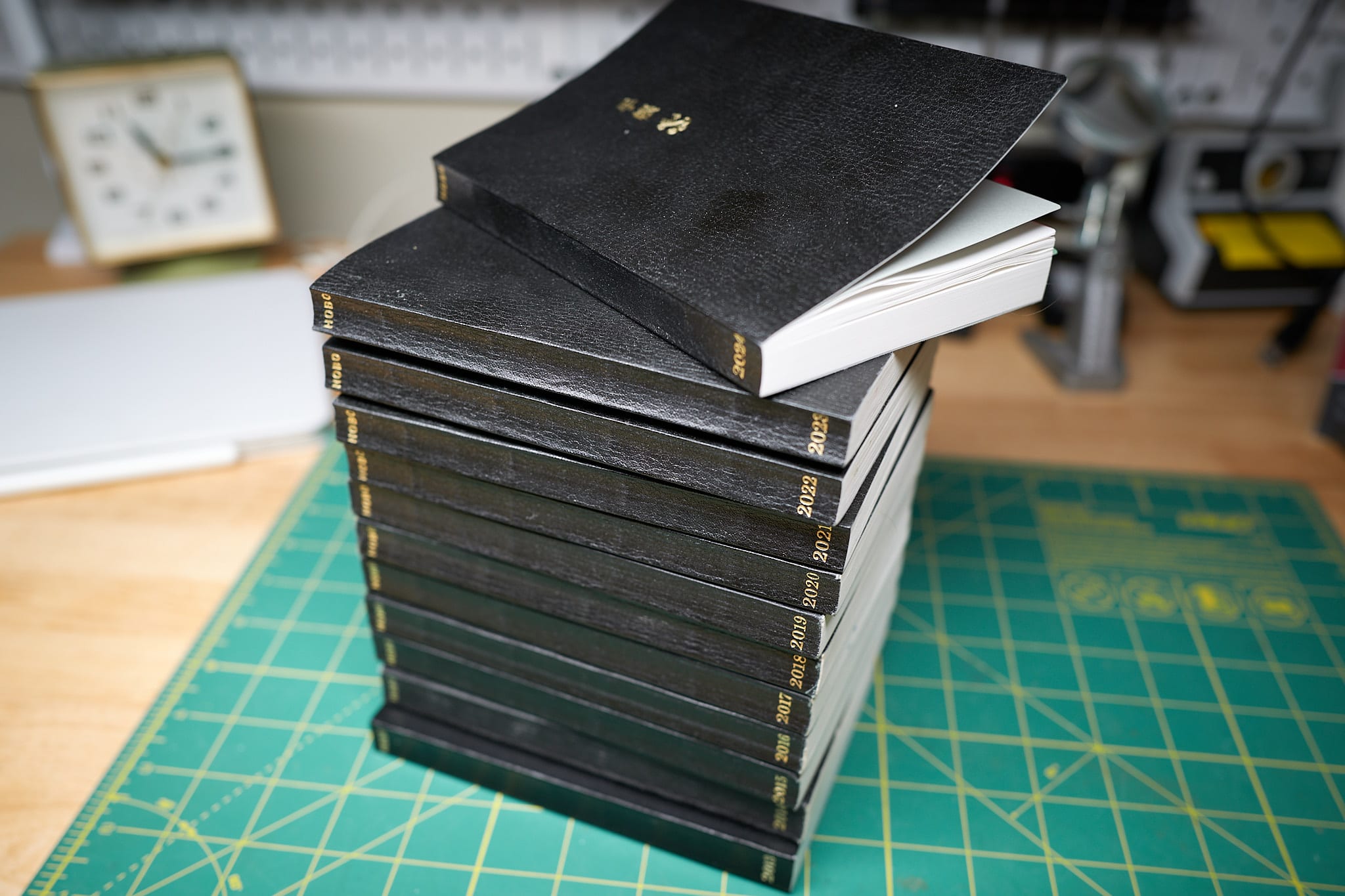
12 years of Hobonichi
12 years of the Hobonichi

I really like the Hobonichi Techo notebook/planners. I've had one sitting on my desk since 2013. The trouble is, I haven't been using it much.

I normally start out the year with a flurry of sketches and planning and logging. Even though that tapers off after a few months, it's always been worth it. This year, though, I've hardly even done that. Most days the page remains blank. The only thing I've actively been using it for this year has been habit tracking.

There are a couple things contributing to the lack of use. First, I'm trying to "Reduce & Simplify". This means that having fewer notebooks is ideal. It's nice not having to decide where to write things. Second, even though the Techo is a great paper planner, I'm less interested in analog planning lately. I've been doing all my paper-based writing/logging in a (Leuchtturm) notebook/journal, but I'm using digital tools and calendars for planning.

If I ever decide to go all-in on paper, or if I'm more often away from my computer, the Techo will be the first thing I pull back off the shelf, but for now, I have no real use for it, so it's retired.

Permalink #

Paper is great

I'm really into paper-based tools lately. This is often a reaction to over-thinking my (digital) note-taking process. And oh my have I been over-thinking that process lately.

Using paper is more work, but it's worth it. Here are a few random thoughts I've had about it recently.

Paper's immutability is something you'd think one would put into the "Cons" column, but I find it to be its greatest feature. I'm fickle and uncertain and my digital notes suffer because of it. When I write something in a (paper) notebook, there it is, forever. I can scribble it out or copy it onto later pages, but I can't change my mind and move it somewhere else based on whatever "system" I decide upon that day. It'll always be right in that spot, in that notebook. I love this.

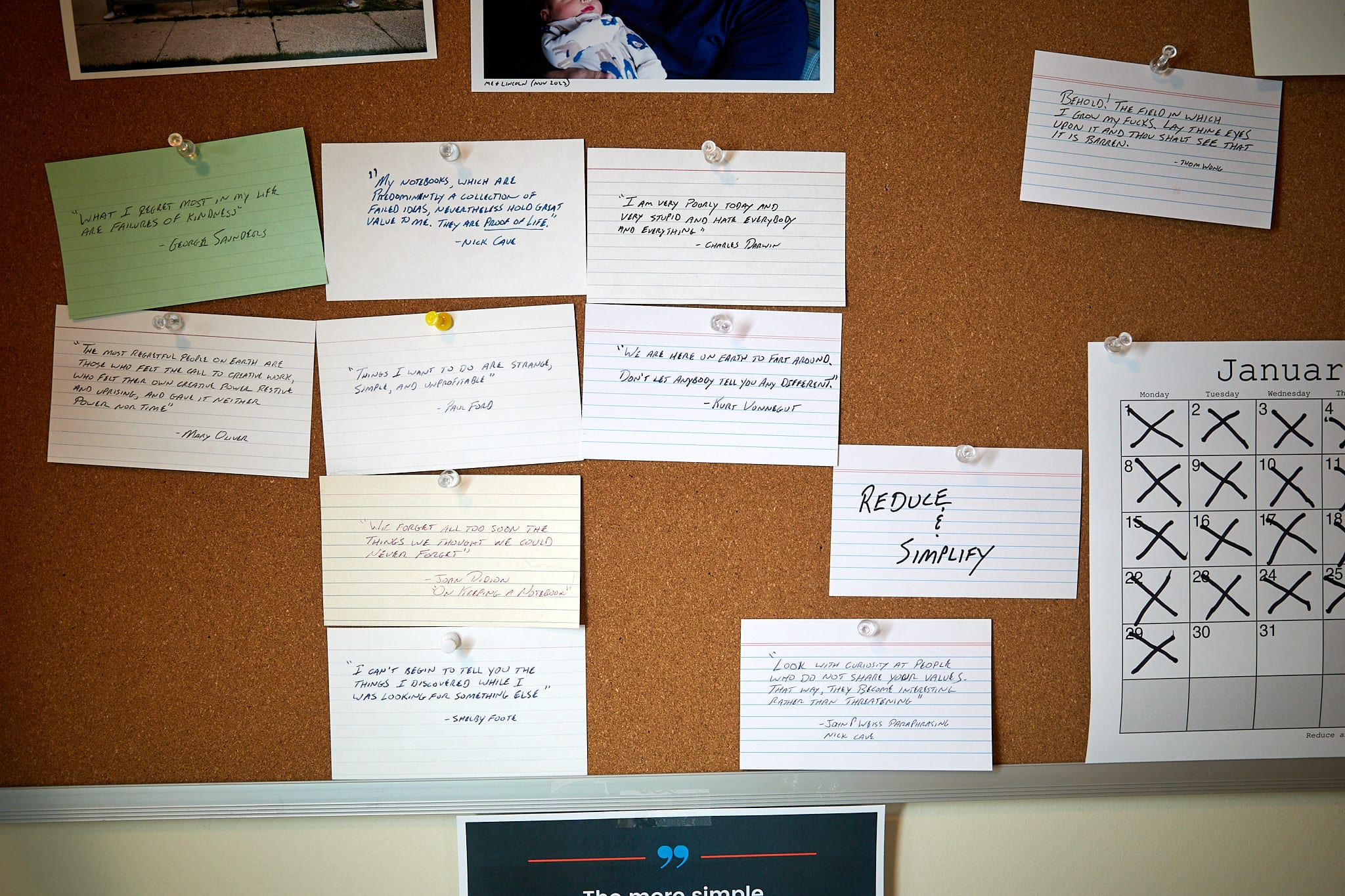
I love jotting quotes and observations onto index cards. I leave these cards lying about or pinned to my bulletin board. They remain visible at all times and that means they are actually seen. Too often, when I take a digital note of some kind it ends up buried in a folder or app and never seen again. I understand that it doesn't have to be this way, but for me, it is.

Have you ever tried flipping through pages on a Kindle? No? Right, because you can't. Or at least it's not worth the effort. I'm forgetful, and being able to quickly thumb back and answer things like, "Wait, who's kid is that again?" is necessary for me to enjoy reading books.

I keep paper journals/scrapbooks in large Moleskine notebooks. I print photos and glue or tape them onto pages then I write on and around them. I doodle in them. Doing this on an iPad with Pencil is cool, but unsatisfying. I like imperfections. I like not being able to Command-Z my way out of everything. I like pulling old ones off the self and flipping through them.

Anyway, digital tools are great and all, but I often prefer paper.

Permalink #

Saxon - Hell, Fire And Damnation

I was surprised to find a new release today by Saxon, the early eighties' stalwarts of British heavy metal. It's good!

I bought my copy on [Bandcamp]( https://hellfireanddamnation.bandcamp.com/album/hell-fire-and-damnation text: Bandcamp).

Permalink #

Arc (Chrome) extension for copying text for TiddlyWiki

I used to have a bookmarklet that would take selected text on a web page and generate a quoted block and link in markup suitable for use in TiddlyWiki.

Arc Browser doesn't support bookmarklets for some strange reason, so I (finally) converted my bookmarklet to a Chrome extension using this tool.

I put a zipped copy here:

copy-quoted-text-for-tiddlywiki.zip

Unzip it, click the "Load unpacked" button on Arc/Chrome's Extensions page and select the folder. No guarantees that it'll work for you, but you're welcome to it.

Permalink #

Wednesday, January 17, 2024

I

I swear some days I want to single-handedly bring back single-use devices.

Remember when I used wttr to show the weather like this?

   _`/"".-.     Light snow
    ,\_(   ).   8(-7) °F
     /(___(__)  ↗ 14 mph
       *  *  *  3 mi
      *  *  *   0.0 in

Historically, the day after getting a COVID booster, I would feel pretty crappy. So far this morning I'm only suffering from a sore arm. This one was from Pfizer rather than Moderna, so we'll see.

I waffle between wanting a boring, simple, clean blog and one that's fun and wild and odd and playful. My heart says the latter but my head says the former. Head wins for now, I guess.

Could I have a Denote plugin for Logseq please? I don't even know it should do, but I want one.

Tuesday, January 16, 2024

Yesterday I wrote that I've lost interest in everything. A few people reached out to make sure I was ok. That was so nice. The blogging community is wonderful, isn't it?! I just want to say that, yes, I'm fine. I was just noticing that I was feeling in a bit of a funk and writing about things helps me think through them. Thank you all for the encouraging words.

Watching my GoAccess logs on the new server, it looks like around 50% of the visits to my blog are via RSS. And there are surprisingly few 404 errors.

I had my annual physical today. I left with the Doctor saying, "I have no concerns." which I'm happy about. My mom's family has a history of Cardiomyopathy, also known as "Dutch Heart Disease", so I mentioned this again and this time he sent me for an EKG and chest X-Ray. The results already came back with "I see no issues with your scans" so whew. My blood pressure is a little high but my Cholesterol is normal. Now if the blood work comes back clean I'll feel pretty good.

OldBoy (2003) ★★★★★

OldBoy (2003) ★★★★★

15 YEARS OF IMPRISONMENT, FIVE DAYS OF VENGEANCE

With no clue how he came to be imprisoned, drugged and tortured for 15 years, a desperate businessman seeks revenge on his captors.

OldBoy remains as powerful, beautiful, and unsettling as the first time.


Permalink #