Finding Howm notes with Org-node

As a huge fan of Denote, I still sometimes dabble with other ways of taking notes in Emacs.

For example, I like the way Howm does notes. I have a growing set of Howm notes, but they feel isolated from my other notes. For a while, I tried keeping Denote and Howm together but it felt like swimming upstream. I bailed on that and broke them apart again.

More recently, I learned about an Org-roam-alike called Org-node. I like org-node quite a lot. There are no enforced file name rules, as in Denote. Any Org-mode heading or file can be a node. All one needs to do is give it an ID property. It's very fast at finding notes. I pointed org-node at my entire ~/org directory. Finding a node is still basically instant.

This got me thinking about Howm again. If I were to add an ID to new Howm notes, I could browse them in the cool, modified-date way that Howm uses, while also making them linkable/searchable with org-node. It doesn't matter where the files are within ~/org. Another advantage is that org-node uses the more standard [id: ] linking method rather than Denote's [denote: ] links.

To make this easy, I added a hook in the use-package configuration for Howm, like so...

:hook
  ((howm-mode . howm-mode-set-buffer-name)
   (howm-create . org-node-nodeify-entry)  ;; <-- add to org-node
   (org-mode . howm-mode))

That's it. With that hook, new Howm notes automatically call org-node-nodeify-entry, which does the right thing. with the file's front matter. I'm going to try this for a while and see how it goes.

Permalink #

My "Use Obsidian for a month" experiment lasted 7 days

Don't ask me why I occasionally try to move away from Emacs. I can't explain it. Under duress, I'd say it's because Emacs swallows the world, and I like changing things up. Doing everything in Emacs makes that difficult. Org-mode is unmatched, but it's also essentially useless outside of Emacs[1]. I get a little twitchy about that. Also, sometimes a package update throws a wrench into my Emacs config or I become tired of C-x C-whatever all the time and so I start shopping for a replacement.

Anyway, this was supposed to be about Obsidian, which lives and breathes Markdown[2]. I can't tell you how many times I've (re)installed Obsidian, thinking this time it'll stick, for sure!

It hasn't stuck yet, but I was determined to give Obsidian the entire month of December to win me over. I made it as pretty as I know how to. I installed the few essential plugins. I created some nice templates. Each morning I'd fire up a new "Daily Note" with my fancy template. Then...nothing. Even though I already knew this, I simply don't enjoy using Obsidian. There's something about it that doesn't jibe with my brain. I don't like how the sidebars work. I don't like how it handles attachments. It doesn't feel right, ya know?

I keep trying to use it because there are things I like about Obsidian. I like that it can do a lot of fancy stuff, easily, and right out of the box without me having to spend hours figuring out why my hand-made Lisp function isn't working. Linking is easier in Obisidian, and although the Graph is mostly useless, it's still cool to look at. "Unlinked mentions" is a great feature for apps like this, too.

The best thing about Obsidian, though, is it works on macOS and Linux without fuss, and it syncs easily with just about any sync tool. Or I can pay for Obsidian Sync, which is even nicer. Oh, and it works on iOS, which comes in handy.

So for a week I tried emphasizing the things I like and ignoring the things I don't. It didn't work. Obsidian is almost certainly the Right Answer for many people, even me, probably. I couldn't do it. I caved after only a week.

That means I'm once again back in Emacs. Emacs is too good at too many things, so I'll probably never be able to leave it permanently. I'll just occasionally become annoyed with something about it and try switching to something else for a minute...again. Maybe Octarine next time ๐Ÿค”.


  1. No need to list the handfull of other tools that pretend to work with Org-mode files. They don't. At least not in any way that's useful to me. โ†ฉ๏ธŽ

  2. Like it or not, Markdown won. And even though markdown-mode in Emacs is great, if I'm using Emacs, I'm going to be using Org-mode. โ†ฉ๏ธŽ

Permalink #

From Apple Photos to Immich

Well, I finally did it. I deleted my 50,000-photo iCloud photo library and moved everything to self-hosted Immich.

Here are some of my notes from the process[1]. It was actually much easier than expected. Shout out to a couple of tools, first.

osxphotos

Python app to work with pictures and associated metadata from Apple Photos on macOS. Also includes a package to provide programmatic access to the Photos library, pictures, and metadata.

I installed it with using Homebrew:

# Add the tap
brew tap RhetTbull/osxphotos

# Install osxphotos
brew install osxphotos

This thing is brilliant. It has a million options and can do pretty much anything with an Apple Photos library. Here's the command I ran to export the entire library in a way intended to work well with an Immich import, along with its output.

osxphotos export /Volumes/MinistackSSD/iCloudPhotosExport \
> --skip-original-if-edited \
> --sidecar XMP \
> --touch-file \
> --directory "{folder_album}" \
> --download-missing
Using last opened Photos library: /Volumes/MinistackSSD/Photos Library.photoslibrary
Created export database /Volumes/MinistackSSD/iCloudPhotosExport/.osxphotos_export.db
Processing database /Volumes/MinistackSSD/Photos Library.photoslibrary/database/Photos.sqlite
Photos database version: 5001, 11.1.
Processing persons in photos.
Processing detected faces in photos.
Processing albums.
Processing keywords.
Processing photo details.
Processing import sessions.
Processing additional photo details.
Processing face details.
Processing photo labels.
Processing EXIF details.
Processing computed aesthetic scores.
Processing comments and likes for shared photos.
Processing moments.
Processing syndication info.
Processing shared iCloud library info
Done processing details from Photos library.
Exporting 47508 photos to /Volumes/MinistackSSD/iCloudPhotosExport...
Exporting 47508 photos โ”โ”โ”โ”โ”โ”โ”โ•บโ”โ”โ”โ”โ”โ”โ”โ”โ”โ”โ”โ”โ”โ”โ”โ”โ”โ”โ”โ”โ”โ”โ”โ”โ”โ”โ”โ”โ”โ”โ”โ”  18% 0:15:032025-12-05 13:27:39,721 - osxphotos - WARNING - photoexporter.py - 1172 - AppleScript export has failed 10 consecutive times, restarting Photos app
Exporting 47508 photos โ”โ”โ”โ”โ”โ”โ”โ”โ”โ”โ”โ”โ”โ”โ”โ”โ”โ”โ”โ”โ”โ”โ”โ”โ”โ”โ”โ”โ”โ”โ”โ”โ”โ”โ”โ”โ”โ”โ”โ” 100% 0:00:00
Processed: 47508 photos, exported: 47731, missing: 35, error: 0, touched date: 95260
Elapsed time: 1:08:39
โžœ  ~

If there's a better combination of options for that export command, it's too late now. Besides, just look at the README. It's overwhelming!

Immich CLI

Immich has a handy CLI. I used it to import that entire Apple Photos export.

Installed the CLI via npm:

npm i -g @immich/cli

Then, after authenticating with immich login, I ran the following:

immich upload --recursive /Volumes/MinistackSSD/iCloudPhotosExport --album

Three hours later, all of my photos were in Immich, with the original Albums and metadata intact. Most of the duplicates were skipped, and I used the Immich duplicate finder to remove the remaining ones. Immich is still chugging away at scanning for faces and running OCR on text in the images. This will take a while, but my library is all there.

After running a backup on the Immich library, I deleted all of my photos from iCloud. Scary, but they'll be in "Recently Deleted" for 30 days, just in case.

The plan is to treat my iPhone as just another camera. I configured the Immich iPhone app to import everything from Photos automatically, so all I'll need to do is clean things up and delete them from Photos every so often.

This is a big change, but it alleviates some of my concerns about relying on Apple/iCloud. It feels good having everything locally on my NAS. Sure, I'm now responsible for everything, but when it comes to my photo library, that's OK.


  1. Thanks to Jacob Roy for the leg up โ†ฉ๏ธŽ

Permalink #

NeoFinder as photo catalog on macOS

On macOS, I prefer Capture One as my RAW editor, but C1's cataloging features are weak. Plus, I'd prefer not having my catalog and editor so tightly tied together. I'd love to get out of the Adobe ecosystem, so I don't want to get too deep into using Lightroom Classic for my catalog. Photo Mechanic is great, but has gotten too expensive.

I thought I'd revisit NeoFinder. I'm glad I did.

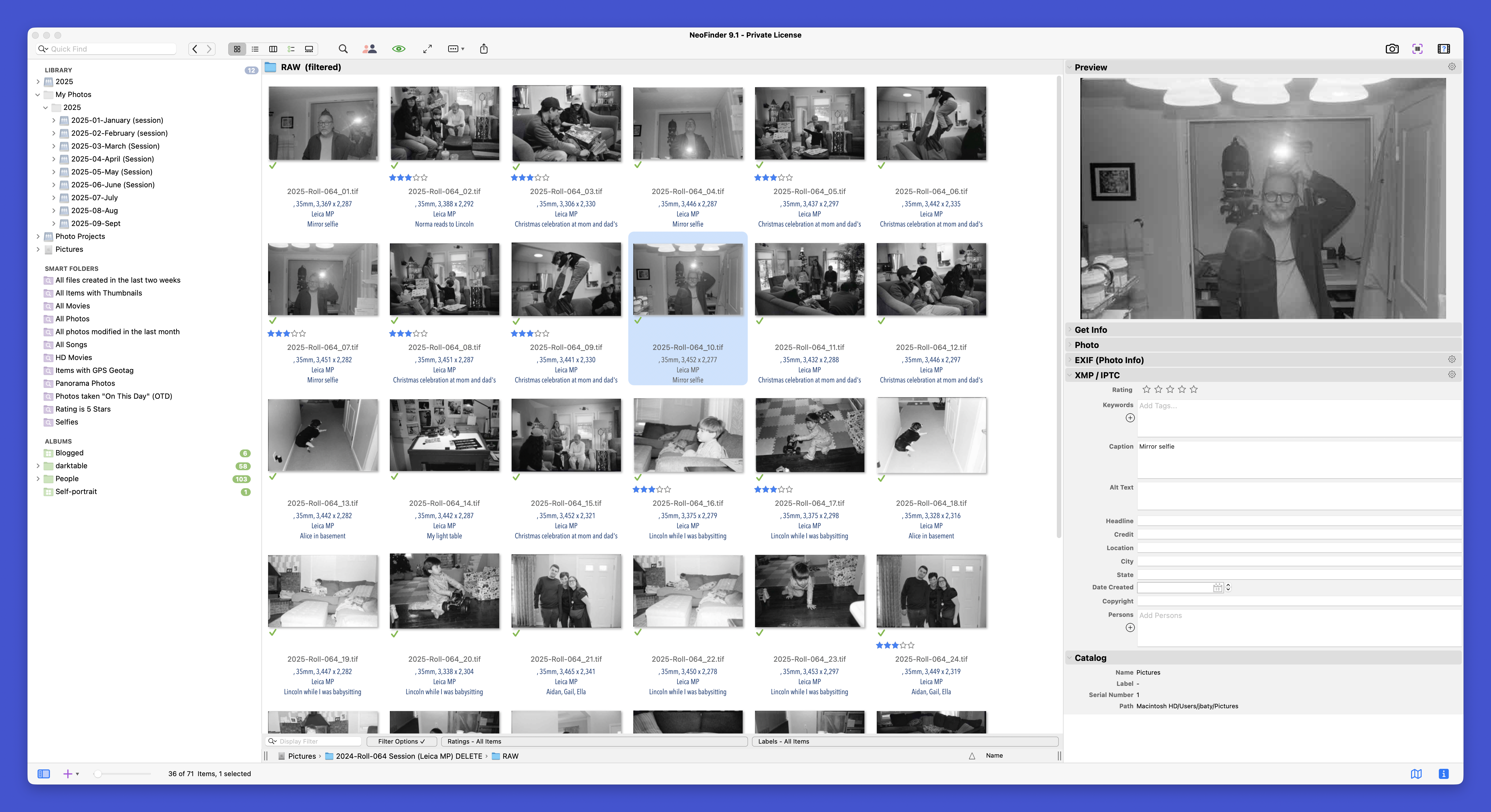
NeoFinder is really good at keeping track of all kinds of media on all kinds of storage. I've put 2025's photos and some other projects into it as a test, and it's impressive. Also, the app just turned 30 years old, so, Lindy Effect.

NeoFinder screenshot

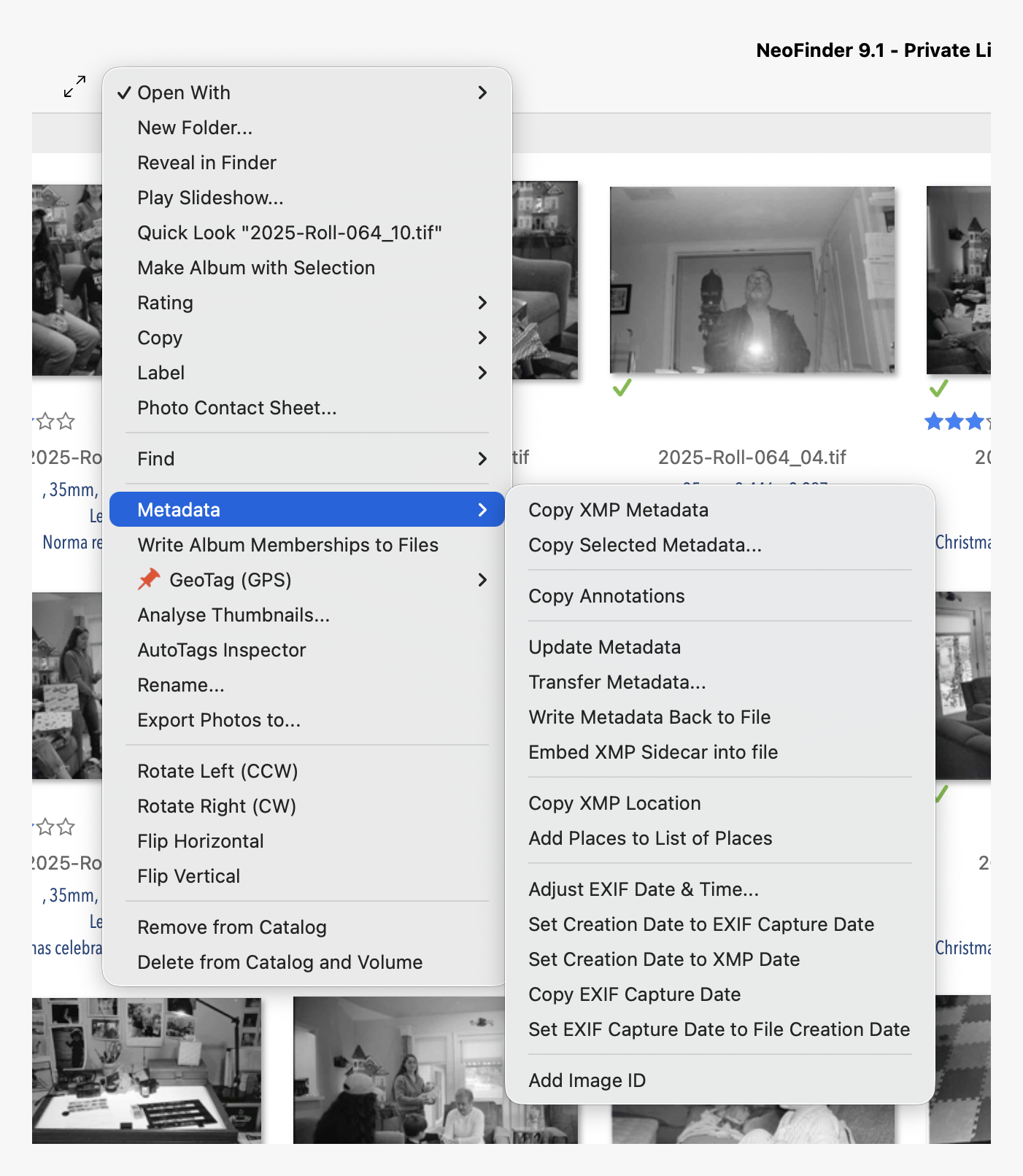
There are all kinds of handy tools to manage photo metadata. Here's just one menu:

NeoFinder menu

Oh, and it's inexpensive ($39.99) with no subscription required.

My current plan is to catalog everything using NeoFinder, then export the edited keepers to my Immich instance for sharing/faces/albums.

I considered using digiKam for this, as it's nicely cross-platform, but I don't think it'll cut it for the whole catalog. There are some nice tools built into digiKam, so it will remain in the toolbox.

The next step is to move everything out of iCloud Photos into Immich. That's a whole 'nuther project.

Permalink #

Follow up on my month using (mostly) only CLI tools

In November, I experimented with using only CLI tools. How did it go?

I'd give it a 7 out of 10.

The other two CLI-based productivity tools I used for the month were Taskwarrior and nb. Taskwarrior is very good at managing tasks, but I don't know if it'll stick as my main task app. There's too much typing involved with keeping things updated (adding tags, projects, etc.). The TUI helps, but I'm not sure it's enough. I'm currently tinkering with Super Productivity as more GUI-ified option, but I'll probably just end up back in Emacs org-mode like I always do.

I'm still exploring nb. It's surprisingly deep and capable, and I'll miss it if I stop using it.

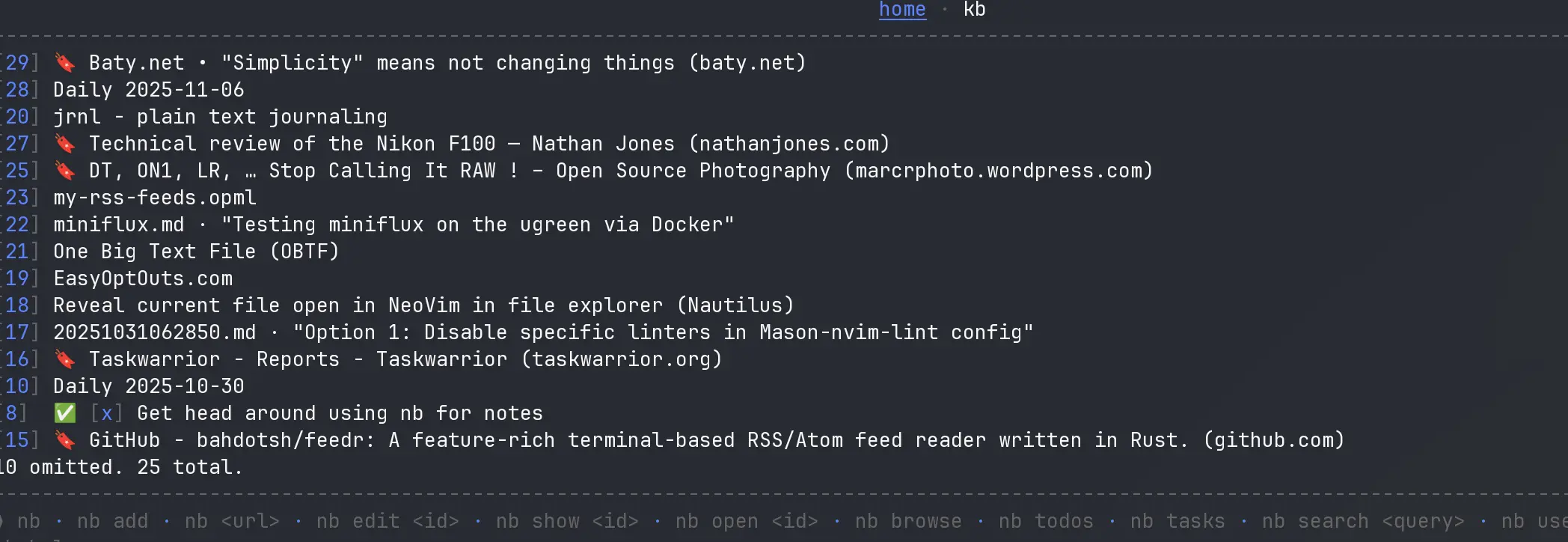
Screenshot of nb

I don't know what I'll use nb for, exactly. It's not like I don't have too many places to keep stuff already. Still, it's neat and handy. The downside is that typing the entry ID gets tedious: e.g. nb edit 157. Another issue is that when there are thousands of files, listings can get pretty slow. For example, in my "kb" notebook, searches can take 10 seconds or longer to return all results. I'm enamoured of it, though, so I'm keeping it around for now.

For email, I'm still using aerc for quickly checking messages. I alternate between aerc and the Fastmail web UI. Both are fine, but I'm surprised by how much I miss Apple Mail on macOS.

The thing that puts me off sticking all CLI, all the time is that sometimes I just want to kick back and drive with the mouse for a while. Being forced to use a keyboard for everything puts me off after a while. I'm happy to be wrapping up the experiment, but I'm hanging on to the CLI tools I've learned to enjoy using.

Permalink #

Vonnegut on maintenance

"Another flaw in the human character is that everybody wants to build and nobody wants to do maintenance.โ€

Kurt Vonnegut

Permalink #

"Simplicity" means not changing things

In Baty.net โ€ข What do I even mean by "Simple?", I was looking for a definition of "simple". I aspire to simplicity, but never seem to find it.

For example, I switched my daily.baty.net blog between Kirby and Tinderbox three times in three days. One day, I want posting to be simple, so I use Kirby, because it's an easy-to-use CMS. The next day, I want hosting to be simple, so I go back to using Tinderbox as an SSG because static sites are simple to host.

The same thing happens with baty.blog vs baty.net. Simple means just typing stuff and hitting "Publish", right? WordPress makes that so easy, I should just use that. But then Zola is just markdown files generating a static website, so that's what I mean by simple.

And photography? Digital photography is the simple option. I don't have to deal with film and scanning or darkroom printing or any of that. Or maybe film photography is simpler. Really, using a small, manual Leica means all I need is a roll of film, a light bulb, and some chemicals. A fully manual camera is simple because there are no settings to fiddle with and it doesn't even need a battery! Or wait, a modern digital camera is even simpler because I can just point and shoot without thinking about focus or exposure or ISO, etc.

Taking notes using markdown files in a folder couldn't be simpler. I can use anything to edit them. And maybe Obsidian to manage everything. No, that gets too complex. Instead, my stable and very personal Emacs configuration is the simplest thing, right? Everything is right there in Emacs. All my notes for the past 10 years or so are in org-mode files. Simple!

Thing is, I switch between all of those options so often it makes me dizzy. No matter what I'm using or how I'm using it, the other thing eventually looks simpler to me, so I switch.

You know what would be the simple solution to simplicity? Stop changing everything all the time! If I would just lean into Emacs and be done with it, my writing/note-taking/task management system would be done and done. If I would realize that I'm emotionally inclined to using an SSG for publishing, I could post everything here using Zola. Simple as can be.

Anyway, long story short, the key to simplicity isn't finding the simplest possible thing. The trick is to stop looking.

But will I ever be able to stop looking?

Permalink #

See you over at baty.blog for a bit

I've become a bit overwhelmed by text after using mostly CLI/TUI tools for the past few weeks. I need a break from looking at tedious walls of text all day, so instead of creating posts here using Markdown, I'm posting to my WordPress blog over at baty.blog for a while[1]. I needed a change of venue. Hope to see you there!

๐Ÿ‘‰ baty.blog


  1. I don't know what I mean by "a while", so don't go too far. โ†ฉ๏ธŽ

Permalink #

I think I prefer using Linux, but can I abandon macOS?

Some thoughts and observations around my feelings about using Linux vs macOS.

For the past week or so, I've been switching between Linux and macOS several times a day. I've been working towared full-time Linux for nearly a month, and planned to relegate the Mac to photo processing only. A sort of photo appliance. While doing that, though, I opened some of my favorite Mac-only apps, and immediately doubted the entire Linux experiment. Things would be much simpler if I used macOS for everything. Right?

I've spent decades with tools like Tinderbox and DEVONthink and BBEdit. It would be hard for me to give them up.

But something unexpected happened during all this. Switching to the Mac began to feel like a step backwards, experience-wise. (I told you it was unexpected). The Mac felt cumbersome. I felt as if I was spending most of my time on macOS moving and resizing windows. I'd end up with like 35 overlapping Finder windows for some reason. It felt chaotic, compared to the tidy window management of Hyprland.

I tried using AeroSpace on the Mac for a couple days, but it wasn't the same as Hyprland. There are other apps that try to emulate tiling, but none that I've tried felt satisfactory.

The other unexpected thing is that I'm starting to prefer certain Linux key bindings. With Caps Lock mapped to Control, Ctrl-c and Ctrl-v are actually easier to hit on my keyboard than Command-c and Command-v. I do miss the Emacs-bindings-everywhere on macOS, but what if I spend more time with Vim bindings wherever possible? Will I miss the other bindings as much?

I'm beginning to understand, and possibly even prefer, the Linux environment, but software is a different story.

Photo editing in Darktable is getting easier for me, but it's got nothing on the speed and ease of using Lightroom Classic or Capture One. This is why I planned to keep the Mac around, just for scanning and processing photos.

Another factor is that while many of my favorite Mac apps aren't available on Linux, nearly all of the Linux apps I'm interested in are available for macOS. It would seem like using a Mac would be a no-brainer, then. Except I can't kick the feeling that Linux suits me, somehow. Or at least it could, with a bit more experience.

I'm finding that I like how it feels to be using Linux[1]. It feels good knowing that it's all mine to do with as I please on whatever hardware I want. I like not thinking about whether Apple will course-correct any time soon.

So, where does that leave things? I'm not sure. If I'm to continue toward my goal of reducing & simplifying, running two operating systems is a bad idea, so I would like to pick one and stick with it. Knowing me, I'm not sure that's feasible.

One indication is that I switched to Linux in order to write this post, and it felt like a relief after being on macOS most of the day. That tells me something. Onward!


  1. Unfortunately, Omarchy comes with some uncomfortable baggage that I'm choosing to live with, for now. No need to scold me. โ†ฉ๏ธŽ

Permalink #

A blog post written with NeoVim

It's been the kind of day where using (or trying to use) Emacs frustrates me.

I've spent the past few weeks adapting my custom Emacs configuration to work on Linux. I was so confident that I would be moving to Linux that I ignored anything that might not work cross-platform. I should know better.

Today I was using my Mac and fired up Emacs and of course nothing worked. I spent nearly 2 hours futzing with it and I still don't know what's gone wrong. Reviewing Git commits hasn't narrowed it down, either. It's not the fact that I broke Emacs, it's more that I'm so capable of breaking Emacs at any time. I do it more than I care to. I'm not in the mood, ya know?

My mood today has been less than festive, so my problems with Emacs just made a bad thing worse, so I quit Emacs in a huff.

I installed the MiniMax configuration for NeoVim and I am typing this post using it. I didn't write a line of configuration and I didn't tweak a thing. It's working fine, for now.

MiniMax isn't as fancy as LazyVim, but it's also not as seizure-inducing by default. It strikes a nice balance between friendly and frenzied.

It's not like I'm switching permanently back to Vim, but when I'm mad at Emacs, this NeoVim setup is pretty nice. Sometimes Emacs and I get into a destructive relationship, and we take a little break. That's probably all this is.

Permalink #

What do I even mean by "Simple?"

For nearly two years I've been telling myself to Reduce & Simplify. For short periods, I've almost done that, but entropy takes over and I once again overcomplicate everything.

Could the problem be that I'm not sure what I mean by "Simple"?

One day, it feels simple to use only Emacs and a browser on Linux installed on boring hardware. The next day, simple means using the default Notes, Mail, and Reminders app on macOS. Then on another day, a notebook and pen are my definition of "simple". What happens is that I end up alternating between all of these so-called simple workflows, and I'm back to chaos.

Simple is "One camera, one lens". But which camera and which lens? If I change my mind every other day, it's no longer one camera, one lens. It's definitely not simple.

Maybe I'm incapable of simplifying. Maybe what I'm doing now is as simple as it gets. I hope not, because what I'm doing now is crazy-making.

What I'd think simplification looks like for me:

  • Linux or macOS? Pick one and run with it. If I still need macOS for scanning or something, turn the Mac into an appliance for only doing that. Stop this waffling.
  • Choose 3 cameras. One for the pocket, everywhere. One for when I'm out and don't mind carrying a camera. One for "serious" work. I don't think I can limit it further than that.
  • One notebook. OK, maybe two notebooks. One for logging/planning and one as a personal journal.

The problem might be that I want to be one kind of person, but I'm actually a different kind of person. They are incompatible.

Still, it's worth a try.

P.S. I'm typing this in NeoVim because maybe that's simpler than using Emacs? ๐Ÿ™„

Permalink #

I kind of hate macOS Tahoe and Liquid Glass

When I started running the macOS 26 (Tahoe) betas, I didn't have strong feelings about Liquid Glass one way or the other.

I've been running Linux for a while now as daily driver, but since I was thinking that I may have to use macOS on the desktop, I've spent a lot of time using both Linux and macOS. Now I kind of hate Tahoe and Liquid Glass.

While getting my Mac Mini (M2 Pro) updated and configured, I was reminded how many times macOS pops up a dialog telling me something needs permissions for something. It feels like I'm constantly clicking "Allow". It happens so often that I no longer bother even reading the messages. I just click "Allow" and move on. Kind of defeats the purpose of the warnings, no?

Then I tried installing some apps that I've been enjoying on Linux, but macOS would deny me because they might be malware. Bite me, Apple. They're not malware and you know it. I can still force the issue and install the apps, but for how long?

I swore I wasn't going to weigh in on Liquid Glass because that would make me about the only person who hasn't. Except that the more I use it, the more it bugs me. Even with the 26.1 "Tinted" setting, it's awful. I'll list three things that bug me about Tahoe.

First, those Playskool-inspired rounded windows. Seriously, windows should be square on desktop computers. This isn't an iPad.

Second, side panels aren't really panels. They're like a separate element hovering over the side of my app window. Feels disjointed and I hate it.

Third, the whole Liquid Glass tansparency thing is wrong. The idea of "respecting my content" or whatever is fine, but don't do it by making parts of my content blurry and unusable while at the same time rendering important UI controls unreadable. If parts of "my content" are going to be illegible, then just hide those parts.

Anyway, many people have written about this in greater detail and more clearly than I, but I wanted to vent a little.

Using macOS was always about the software, hardware, and OS. Apple still makes great hardware, and app developers still make great software, but macOS no longer feels all that much better than alternatives. If I decide to stay with a Mac on the desktop, it'll be for the apps, in spite of macOS.

Permalink #

I may have to use macOS on the desktop

I'm trying to get everything running smoothly on the Linux machines. I really am. And I'm close, but I'm not there yet, and I'm not sure if I'll ever get there.

Many of the apps I use on macOS are also available on Linux. This is awesome. It's the ones I love, but need to leave behind that are causing all the trouble.

Most of the problems are around photo processing. I've spent many (many!) hours learning and testing Darktable for RAW processing. It's a powerful tool with a lot of clever ideas, some of which I actually prefer to its Mac counterparts. However, Darktable is not at all pleasant to use. Once the cleverness and new-shiny factors are past, I'm forced to live in a clumsy, awkward, unpleasant, unattractive environment. I miss Capture One dearly. Capture One gets me results I like quickly and easily. It's better.

Then there's scanning. I've spent years wrangling SilverFast to a point where I don't hate it. Recent updates have introduced the feature of scanning multiple (3, in my case) frames at once, making it much faster. I used to use Vuescan, and it's available on Linux, so I tried it. So so slow. And it does a pretty poor job with color film.

With digital camera scans, nothing beats Negative Lab Pro for doing inversions. NLP requires Lightroom Classic, so I'm kind of stuck there. I tried the Negadoctor feature of Darkroom and, while feasible, inversions are slow and tedious.

Photography is not just something I tinker with occasionally. It's my most enjoyable hobby. I don't think I want to suffer through it, just so I can use Linux.

There are several other apps that I seriously miss from macOS. BBEdit is still unbeatable for ease of use, stability, and capabilities when it comes to manipulating text. Tinderbox is one of a kind for outlining and notes. There's nothing on Linux comparable with OmniFocus for task management. And so on.

But the deal-breaking omission might be Messages. Everyone I communicate with regularly uses Apple Messages and Facetime, exclusively. I can't stand typing on my phone, so having to hear an alert, grab my phone, and fumble my way through a reply is maddening. Also, I can't quickly send people links or photos from where I am. How am I supposed to share that hilarious meme if it's so much effort?

On the other hand, I love using the Framework laptop when away from my desk. I like the keyboard better than the MacBook Air's. Knowing I can easily upgrade or fix things (inexpensively) for years is very compelling.

So all this to say that I may end up using a Mac on the desktop and Linux on the laptop. I swore I'd never do that again. Between sync, paths, configuration issues, filename case mismatches, and wildly different key bindings, using both is a royal pain in the ass.

This rambling post is just me working through all of this. I'm typing this post using BBEdit on the Mac Mini, and I gotta say that having the standard Emacs keybindings everywhere is a compelling case for macOS for me.

I'll keep you posted.

Permalink #

Has it only been a week?

I started my CLI app only experiment at the end of October, meaning that it's been just over a week of nothing but CLI and TUI apps for nearly everything. How's it going?

Well, it's been fun. I suspected it would be, because I've been living in a terminal on and off for decades now. It's not as if terminal apps are new to me. Diving back into them has been a blast.

But here's the thing. Once the novelty wears off, it can become a bit tedious. I love being able to use the keyboard for everything. I just don't want to have to use the keyboard for everything all the time. Sometimes I want to kick back and mouse around for a while. I'm finding that this comes up more often than I expected.

Another drawback to everything-in-a-terminal is that everything looks the same. My email, my notes, my tasks, my files, everything. It's a bunch of similar rectangles and it can become kind of boring.

So, right now, I have mixed feelings about the whole enterprise, but I'm sticking with it for now. Today I'm going to see if I can get LazyVim to calm down and just let me write instead of trying to tell me how to write. (It's probably the whole LSP integration thing).

Permalink #

An experiment using jrnl for logging

Speaking of jrnl, did I mention that I'm testing jrnl as my daily logging tool?

Since I'm sticking to CLI-based tools for the month, I needed a replacement for my Emacs "Daybook". My Daybook relies on all sorts of capture templates and snippets in Emacs. Since that's out, I figured I might try the One Big Text File (OBTF) approach.

By default, jrnl writes entries to one big text file, so it seemed suitable for this purpose.

It's only been a day or two, but I kind of dig using jrnl for the kinds of quick logging I normally do in Emacs. It automatically adds timestamped headings, handles @tags, uses human readable date entry (e.g. "last wednesday"), allows searching by tags or date range or content, and exports nicely to various other formats.

I might also include the entries I usually put into org-journal. I can't imagine jrnl taking org-journal's spot, but it's worth trying. I'll tag those entries as @journal and then I can export just those to markdown for conversion to PDF and printing, as one does.

Permalink #

Popup jrnl window in Hyprland

I'm slowly learning how to customize Hyprland.

I've been playing with jrnl as a way to do a daily log. It's been successful enough that I wanted to streamline it a bit. What I wanted was to bind a key to opening my jrnl prompt in a floating terminal in whichever workspace I happen to be in.

Here's how I did it:

# Keybinding for floating centered terminal
bind = SUPER SHIFT, J, exec, alacritty --class floating-term -e jrnl --config-override editor ""
windowrulev2 = float, class:(floating-term)
windowrulev2 = center, class:(floating-term)
windowrulev2 = size 800 60%, class:(floating-term)

This gets me a conveniently sized and placed terminal window with jrnl waiting for me to type whatever I want. A simple CTRL-d and it creates the jrnl entry and the window goes away.

The jrnl --config-override editor "" bit forces jrnl to wait for stdin so I can just start typing.

Screenshot using jrnl window

It may be overkill, since I could just type jrnl in any terminal, but this is just a smidge more convenient.

Permalink #

Tridactyl for Firefox

I use Zen Browser on Linux. While playing around with LazyVim (I know, I know) I learned about Tridactyl which is a plugin that let's you manipulate Firefox (or Zen) using Vim-like key bindings.

It feels weird and I keep tripping over myself, but I feel like once I'm used to it, this is a great way to browse.

Permalink #

Sunday, October 26, 2025

Black and white film photo of a sewer cover
Trump administration, this way / Nikon F100

I spent all morning toying with a few different static blogging options that could replace Hugo.

Kev had generously sent me a head start on a Jekyll theme that mimics my WordPress theme at baty.blog. I installed Jekyll and (to my surprise) I didn't hit any Ruby walls. While it was a great head start, I realized how much work remained, and I'm still not sure I want to use Jekyll.

The worst thing about Hugo is the templating language. It's so weird to me. Weird enough that it prevents me from tweaking things the way I like. For kicks, I installed Zola, which I haven't played with in years. It's like a sensible version of Hugo (single binary, etc.). I failed to port the theme Kev gave me to Zola, so I installed a pre-existing theme, Tabi. I kind of like it, but it's not really what I'm looking for, and I don't think I want to learn enough about Zola to make it happen.

So it's 2:00 in the afternoon and I've got nothing but dead ends to show for my day. Still in Hugo for now. It's a beautiful day, so I think I'll go for a nice walk.


You know what site of mine works just the way I like it? daily.baty.net. I tend to forget that. The problem is usually that it's (currently) built using Kirby CMS and I kind of don't want to stay sharp with Kirby. Maybe I'll just use it as is until something breaks. If nothing ever breaks, I'm golden.

  • STATUS: Futzing with Zola and Jekyll in an attempt to pull away from Hugo but stay in SSG land.
  • TODO: Nothing!
  • LISTENING: Frank Zappa, Hot Rats (on Vinyl)