Director of Unspecified Services.
Amateur photographer, blogger, and curious nerd.
Welcome to my blog about everything, since 2000.
Creating Hugo posts using hpost (from Mike Hall)
Creating a new blog post for Hugo couldn’t be simpler. One simply creates a new Markdown file in the correct folder, making sure it contains the proper YAML front matter, and…OK, it’s not that simple. Normally I use a small lisp function in Emacs for creating posts, but that doesn’t help me on days that I don’t feel like using Emacs1. Another option would be to use the built-in hugo commands, but for some reason I never think of that. Probably because it requires that I cd to the right place and tell it what to name the file. ...

Friday, July 18, 2025
Don’t you wish I had only one blog? I do.
Tim Minchin - Confirmation Bias
If he’s a bit manic for you, here’s part of the transcript that I’ve reformatted a bit: ...if you're a progressive, don't do this. Don't go on to the internet and go, "Hey fellow progressives, like maybe we should consider having, you know, a little - just just chill out a bit and have a bit of humility and realise that not everyone's had the opportunity to read the books we've read and not everyone's, you know, learned the lessons that you've learned. Maybe we should apply the Principle of Charity and not assume that anyone who disagrees with us has a nefarious intent and try and hear the best version of the argument, not the worst. And maybe we just need to-" They go, “Don’t you police my tone, you straight white male! Check your privilege!” ...
Org-mouse Emacs package
org-mouse is a built-in package for Org mode that lets one do some handy things using the mouse in Org files. Things like checking checkboxes and toggling subtrees. (use-package org-mouse :after org) Or just (require 'org-mouse) Clicking in [ ] Do this thing to complete it is easier than navigating to the line and hitting C-c C-c for each item. There’s no shame in using a mouse, even in Emacs. I sometimes prefer to sit back, grab the mouse, and click things. ...
Thursday, July 17, 2025
I’m editing this in (Neo)Vim because I feel like living in normal Vim bindings for a minute, without the grief I cause myself trying to use evil-mode in Emacs.
Why do I keep trying Obsidian?
I know I won’t like Obsidian this time, either. Yet, I keep trying.
Glass.photo Series
What if I used Glass for my film roll posts, instead?
Monday, July 14, 2025
Firing up a new daily note every morning used to be a regular thing for me. Lately, it just gives me blank page anxiety. It’s possible that an “I don’t feel much like blogging” phase is starting. I know this because I don’t feel much like blogging. I have a doctor’s appointment today. Just a scheduled follow-up, but there’s a lot of pre-appointment guilt happening. My blood pressure is a little higher than we’d like, so in our last meeting I suggested that instead of upping my meds, that I eat healthier and exercise more. I’ve done neither of those, so my BP will still be too high and he’ll have to tsk-tsk me and prescribe something stronger. I hate having to take medications, but it’s my own damn fault. ...
Saturday, July 12, 2025
Reverting my blogging changes
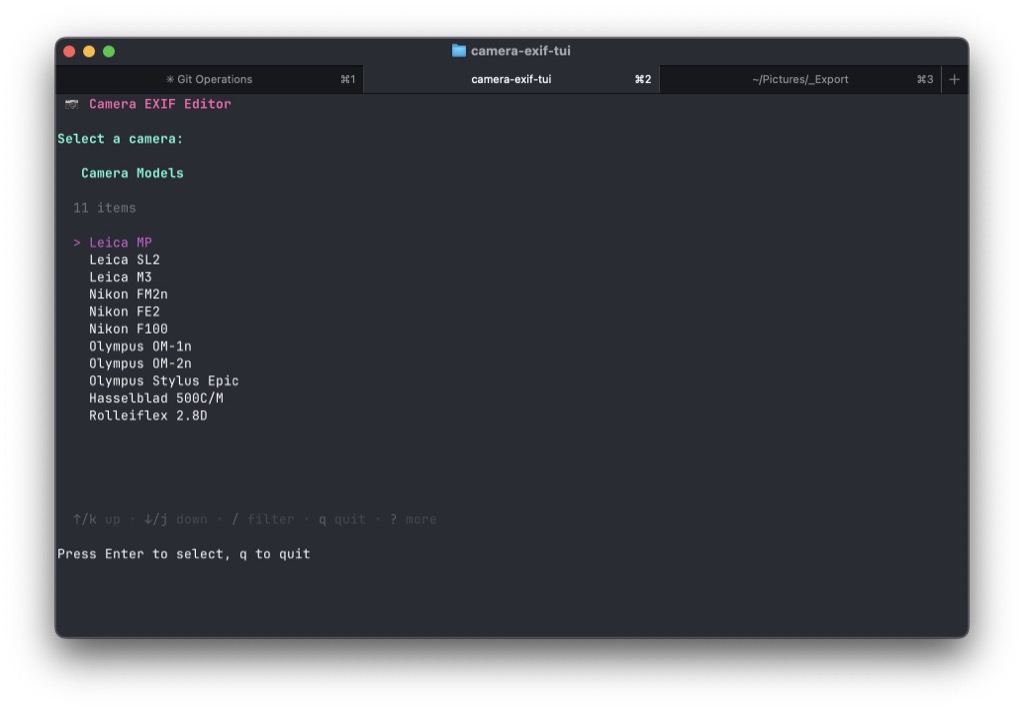
A little TUI for updating exif data in photos
I like to have Make and Model information available in film scans, and use exiftool for this. I have a lisp function in Emacs that does this, but sometimes I’d like to do it from a terminal instead. So I asked Claude for help. The result was camera-exif-tui. It’s a tiny Go app that launches a TUI that allows me to select a make/model and a folder full of image files. It calls exiftool and updates the images with the selected camera info. ...

Duplication
Here are some (probably) unnecessary things I’ve been doing.
Sunday, June 29, 2025
Just seeing if this thing still works.
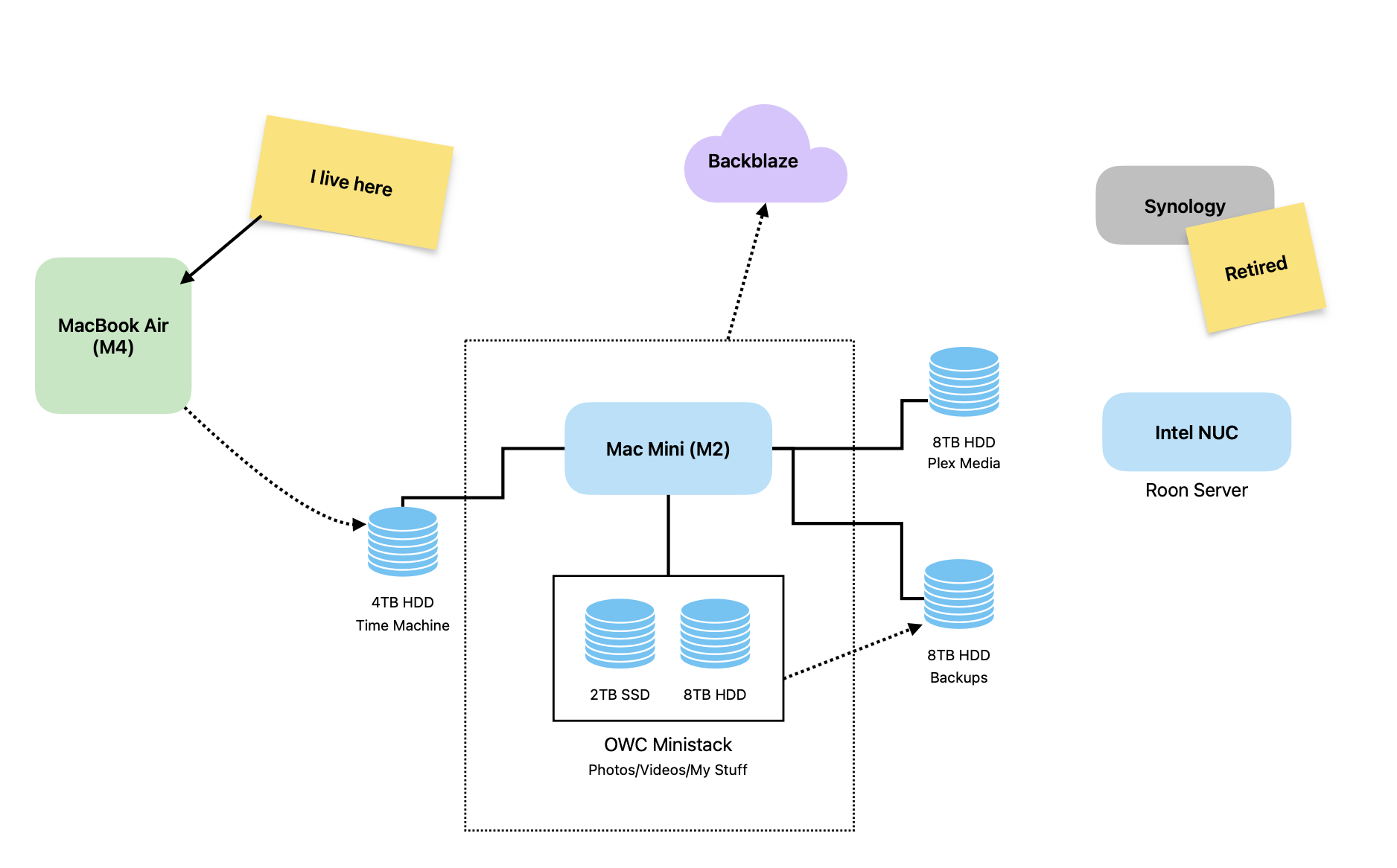
My updated computer setup
The new M4 MacBook Air arrived, and it changed how I have things set up around here.
One Computer
It seems I’ve finally actually “Reduced & Simplified” something.
Importing Org Journal to Day One
I wanted a different view into my org-journal history, so I imported it into Day One Plain text is great, but has limits. I’ve been journaling in plain text (.org) with org-journalsince 2018. It’s just a bunch of .org files in a folder. It’s great, and, you know, future-proof. Before Org-Journal, I used Day One for journaling as far back as 2011. Day One is pretty, powerful, and available everywhere. There are “on this day” and “today” features that I find useful. It integrates smoothly with the Photos app, and it stamps entries with the current location and weather conditions. Add fast sync on all devices with end-to-end encryption, and it makes for a darn nice journaling setup. ...
I'm about to do it again
Baty.net is going to move back to Ghost, I think. Y’all will I’m sure get a chuckle out of it and I’m happy for you. :) I’ve noticed that when running both Ghost and Hugo blogs, when I want to post something, my default is to reach for Ghost. It’s just easier overall. Plus, I can have that sweet, sweet @jack@baty.net Fediverse handle that I loved but didn’t want tied to my blogging platform. ...
Hard Mode and status
Joan Westenberg, in The Cult of Hard Mode: Why Simplicity Offends Tech Elites: …hard mode is where status lives. This is exactly what I’ve been thinking about lately. It hurts to hear it out loud. Read the article, but here are a few quotes that reminded me how far down the complexity rabbit holes I’ve traveled. And under it all is the same impulse: make it harder than it needs to be, so I can feel smarter than I am. ...

Wednesday, June 11, 2025
Daily notes. What are they for? I guess it’s like having a legal pad open on my desk, where I can write whatever I’m thinking about at any time. The problem for you, dear reader, is that you’re subjected to all of it. I feel a little guilty about that. Not guilty enough to stop doing it, of course. I am a different person every day. Too different.

Tuesday, June 10, 2025
If there are “Notes” listed under this post, it means the thing I’ve been working on here is…working, I guess. (Update, they’re missing from the RSS feed. I’ll work on that later.) Trusting your own judgement on ‘AI’ is a huge risk: Something seemingly working is not evidence of it working. (Long, but worth reading). I dunno, seems to me that if it’s working, it’s working, but I suppose that’s his point. One can argue that AI is bad for the environment, or bad for artists, or stealing, and you’d have a point. But when you argue that “Well, it doesn’t actually work. It can’t think!” then that’s where we part company. Even though I agree with a lot of the article, it’s the kind of thing someone writes when they really really don’t wan’t something to be true. I swear I’m going to stop commenting on all this nonsense and go back to the super-cool homeopathic software I co-wrote (aka “vibe-coded”) today. You know, the one that’s working. I don’t need to prove anything to you. ...
My app deletion fiasco
When a simple app “cleanup” on my Mac Mini went way WAY too far.